Kitchen display
The live order board: three columns, an all-day count, and a health strip that shows what is running late.
Restaurant → Devices → Open kitchen board
Three columns
- Stations — the whole kitchen, or one station's tickets.
- New — tickets that have arrived. Accept, then Start prep.
- Preparing — being cooked. Mark ready.
- Ready — waiting to go out. Complete.
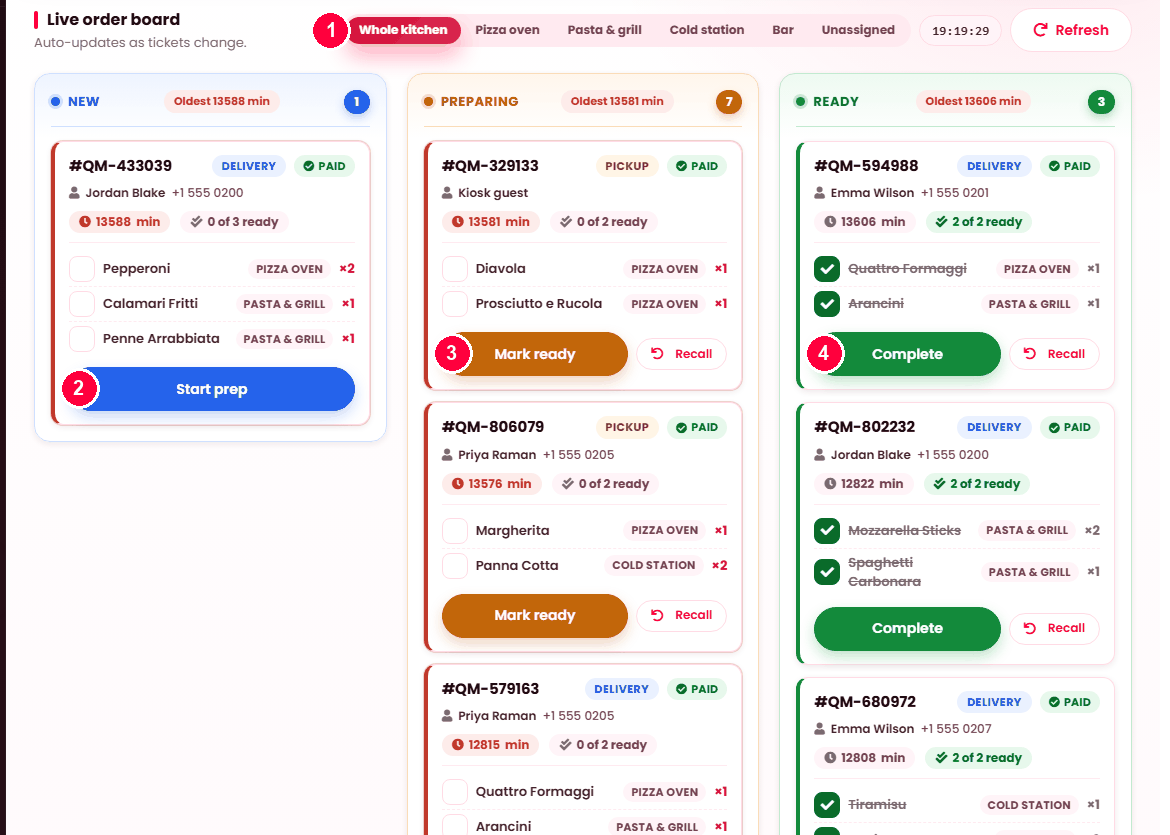
The board updates itself as tickets change — nobody needs to refresh it. If it loses its connection it says Not live — retrying rather than quietly showing stale tickets, which is the failure that matters in a kitchen.
The health strip
Across the top, how the kitchen is doing right now:
| Reading | Meaning |
|---|---|
| On time | Comfortably within target. |
| Due soon | Approaching it. |
| Late | Past it. |
| Badly late | Well past. These are the telephone calls you are about to get. |
Each column also shows its oldest ticket's age, or Clear when there is nothing waiting. Age of the oldest is a better read on a kitchen than a count — ten fresh tickets are fine, one at 40 minutes is not.
All day
A running count of every outstanding item across all tickets — twelve burgers, four salads — so a cook can batch rather than working ticket by ticket. It reads Nothing outstanding when the board is clear.
Recall
Recall pulls a ticket back a step when something is marked too early. It is a small button that saves a large argument. Some moves cannot be undone, and the board says so rather than pretending.
One board or several
A display is bound to a station or to the whole kitchen. Bound to a station, it shows only that station's dishes — so the grill screen is not carrying dessert tickets. Set the binding on Devices.
Check the unassigned count on the categories screen before relying on this. A dish reaching no station appears on no board.
Automatic steps
Some moves happen for you — a ticket may be auto-accepted, or auto-completed when marked ready, depending on how the order arrived. The board records which, so the history distinguishes a cook's action from the system's.
When it doesn't work
"Not live — retrying"
The board lost its connection. It keeps trying. Refresh forces it.
An order is not on the board
It is unpaid, its dish reaches no station, or this board is bound to a different station.
"This order already moved on"
Somebody else advanced it from another screen. The board refreshes itself — no harm done.
"Session expired"
The screen has been open too long without activity. Refresh the page. On a permanently mounted screen this is worth avoiding by leaving the board as the only thing it does.