Point of sale
The till: building a ticket, holding it, splitting it, discounting it, and taking the money.
Restaurant → Devices → Open POS
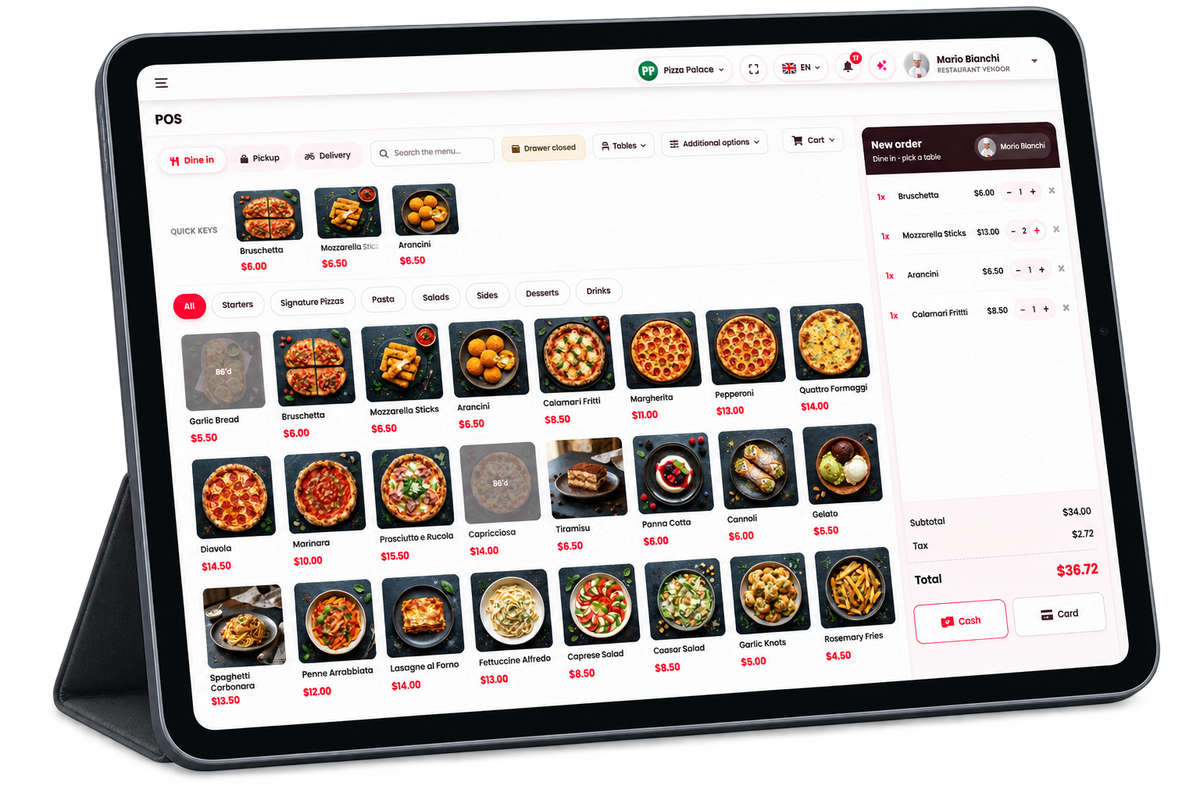
The till runs in a browser, so any tablet or laptop is a terminal — no install, no dedicated hardware.
- Order type — dine in, pickup or delivery.
- Quick keys for what sells most, then the full menu by category.
- The ticket on the right, with subtotal, tax and the total.
- Cash or Card to take payment.
A dish marked 86’d is greyed out and cannot be added.
The till's own settings
A till is a registered device, so what it can do is set on its row under Restaurant → Devices: whether it takes payment, its card reader and receipt printer, the cash drawer, and how orders are handled. See Device settings.

The till's style and layout
Restaurant → Device settings → POS settings → Till layout
The same till comes in four styles. Every style has the same menu, prices, buttons and ticket; only the arrangement and the look change, so staff who know one can work any of them. The style belongs to the restaurant and applies to all of its tills.
| Style | What it looks like |
|---|---|
| Style 1 | The till as it has always been: light, a photo tile for each dish with its price, the ticket on the right. Every restaurant starts on it. |
| Style 2 | Dark, with the categories on a rail and every dish a photo key. |
| Style 3 | A classic register board of flat, square keys, with the ticket on the left. |
| Style 4 | A terminal layout in framed zones: colour-coded keys with large prices and no photos, the ticket down the left, the categories and the pay keys down the right. |
- Till style — a picture of each style. Click a picture to see it full size, and choose a style with the switch under it.
- The switches below — show or hide parts of the till, whichever style is chosen.
- Press Save. A till picks up the new style the next time it is opened or reloaded.
| Switch | Shows or hides |
|---|---|
| Tables button | The floor zones button and the table section it opens. |
| Additional options | The deck of extra till functions. |
| Shortcuts button | The keyboard shortcuts button. |
| Dish photos | The photos on the menu tiles. Style 4 has no photos, so this switch steps aside while Style 4 is chosen; its setting is kept for the other styles. |
| Breadcrumb bar, Top bar, Left sidebar | The dashboard frame around the till. Switch all three off for a till that fills the screen. |
| Install app button | The prompt to install the till as an app. Off until you turn it on. |
Building a ticket
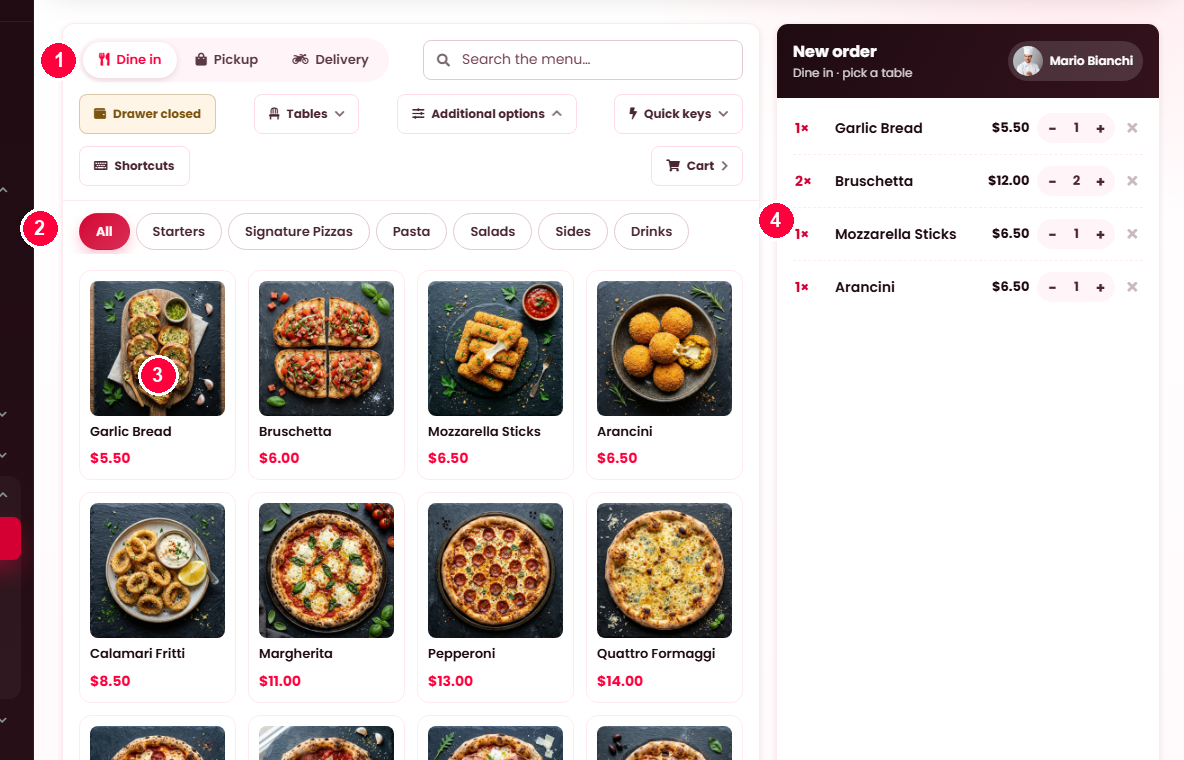
- Order type — dine-in, pickup or delivery. Dine-in asks which table; delivery asks for an address and applies the delivery fee.
- Find the dish — category tabs, or the search box.
- Tap a dish to add it.
- The ticket builds on the right (on the left in Styles 3 and 4), with the running total and a Charge button carrying the amount.
The function bar
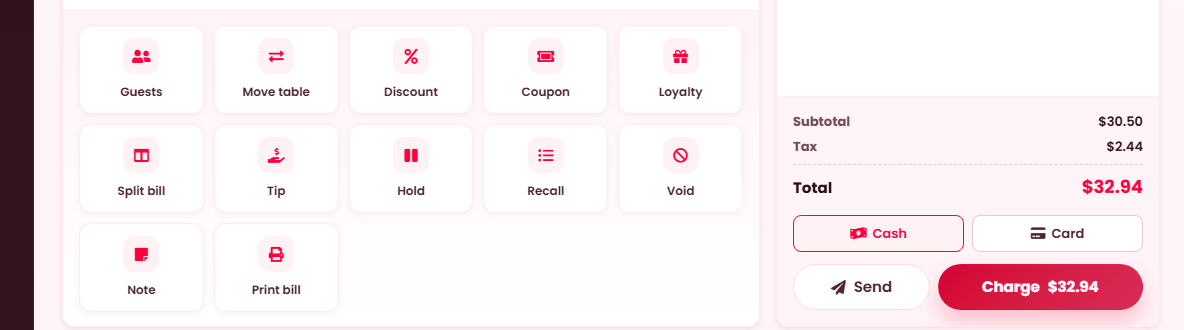
Under the menu grid, with payment on the ticket:
Hold and Recall together are what let one till serve several tables at once: park "Blue jacket", serve somebody else, recall it when they are ready.
| Button | Does |
|---|---|
| Guests | Sets covers, and optionally names the party ("Smith, table of 4"). |
| Move table | Moves the party to another table, or merges with one. |
| Coupon | Applies a code, checked against this restaurant. |
| Split bill | Divides the check — see below. |
| Hold | Parks the ticket under a name you give it. |
| Recall | Brings back open and parked tickets. |
| Void | Cancels a line or the whole order, with a reason. |
| Print bill | Prints the bill before payment. |
Customers and loyalty
A loyalty member is a phone number. Search by phone, name or email and pick the customer, then Attach to order. When the search finds nobody, a New customer form opens with the number already in place — name and phone make the account, email is optional — and the same button reads Add & attach to order. A ticket that carries a phone in its customer box but no attached account is placed for the member that number names (one is created on the spot if needed), so a walk-in who gives their number earns without any extra step. Once attached, their loyalty rewards can be redeemed against the bill; a customer with no number on file cannot earn, and the card says so. Removing them detaches without disturbing the order. All of this follows the venue's At the POS switch under Settings → Loyalty.
Discounts
A manual discount applies to the whole order or one selected line, as a percentage or an amount, and a reason is required — loyalty/regular, service recovery, staff meal, damaged/remake, promotion, or manager comp. The new total is shown before you apply it.
Voiding
A line or a whole order, with a reason from a fixed list — wrong item, changed mind, kitchen error, out of stock, comp, duplicate. Your own reasons appear alongside; see Reasons.
A ticket already sent to the kitchen needs manager approval to void, and the screen says so. Food that has been started is a cost either way, and that decision should be somebody's rather than nobody's.
Splitting a check
Three ways, and each settles its shares separately:
| Method | Use when |
|---|---|
| By guests | An even split. Choose how many ways. |
| By item | Everyone pays for what they had. |
| By amount | Somebody is covering a specific figure. |
The screen carries a running balance to collect, so a part-paid check is never ambiguous.
Taking payment
Cash, card or other. Cash asks the amount tendered — with an Exact shortcut — and calculates change due. Card either charges the reader ("insert, tap or swipe") or records that a machine took it. Tips can be added as a chip or a custom amount, if your platform has tipping on.
Protections worth knowing about
- A double tap does not double the order. Each ticket carries an identifier, so a retry after a slow response settles the same order rather than creating a second.
- An already-sent ticket cannot be re-sent. The till says to settle or void it.
- 86'd dishes are marked on the menu, so staff are not offering what the kitchen has run out of — see Inventory.
Notes
An order note reaches the kitchen — "nut allergy on table, no coriander". Use it for anything a cook must know rather than anything you want remembered.
When it doesn't work
"Connection unavailable. Reload the page."
The till lost its connection. If your platform has offline terminals switched on, orders are held and sync when it returns — see Working offline.
Cash payment is not offered
The drawer shift is not open, or the device does not take payment.
A discount is refused
It needs a manager PIN, or no reason was chosen — the reason is required.
The order did not reach the kitchen
At Restaurant → Devices, check the till's Order handling — Hold for staff means nothing is sent until somebody acts. If that is not it, the dish reaches no kitchen station: the unassigned count is on Restaurant → Menu → Categories.
A parked ticket has vanished
Look under Recall, which lists open and parked tickets together.