SMS
Text messages for the three things that cannot wait for an inbox — and the log that says which were sent, refused, or never attempted.
Admin → Settings → SMS · SMS log
SMS is optional, and narrow on purpose
Texting costs money per message, so the platform sends only what genuinely needs to arrive within seconds. Everything else is email. Three purposes:
| Purpose | Sent to |
|---|---|
| Verification code | Somebody confirming a phone number. |
| Table ready | A waiting guest whose table has come free. |
| Payment link | A customer being asked to pay for an order by link. |
Leave SMS switched off and all three fall back to what they did before. Nothing breaks.
Get your Twilio credentials
Twilio is the SMS gateway QuickMunch talks to. You need your own account — it takes about five minutes, and a trial account includes a free number and credit to test with. Do all of this on Twilio before you fill anything in here.
Step 1 — Create the account
- Go to twilio.com and choose Sign up, top right.
- Enter your name, email and a password.
- Verify your email address, then your phone number — Twilio texts you a code.
Step 2 — Get a phone number
- Signing in the first time starts a trial account; follow the prompts.
- Twilio offers you a phone number — pick one from the list. On a trial it is free.
- Choose a number in the country you text most. Some countries refuse messages sent from a foreign number, and some refuse sender names entirely.
Step 3 — Copy your credentials
- Open the Twilio Console home — the page you land on after signing in.
- Copy the Account SID: a long string beginning
AC. - Reveal and copy the Auth token beside it.
- Keep both somewhere safe. The Auth token is a password — anyone holding it can send messages billed to you.
The three values you are bringing back look like this:
Account SID    ACxxxxxxxxxxxxxxxxxxxxxxxxxxxxxxxx
Auth token     xxxxxxxxxxxxxxxxxxxxxxxxxxxxxxxx
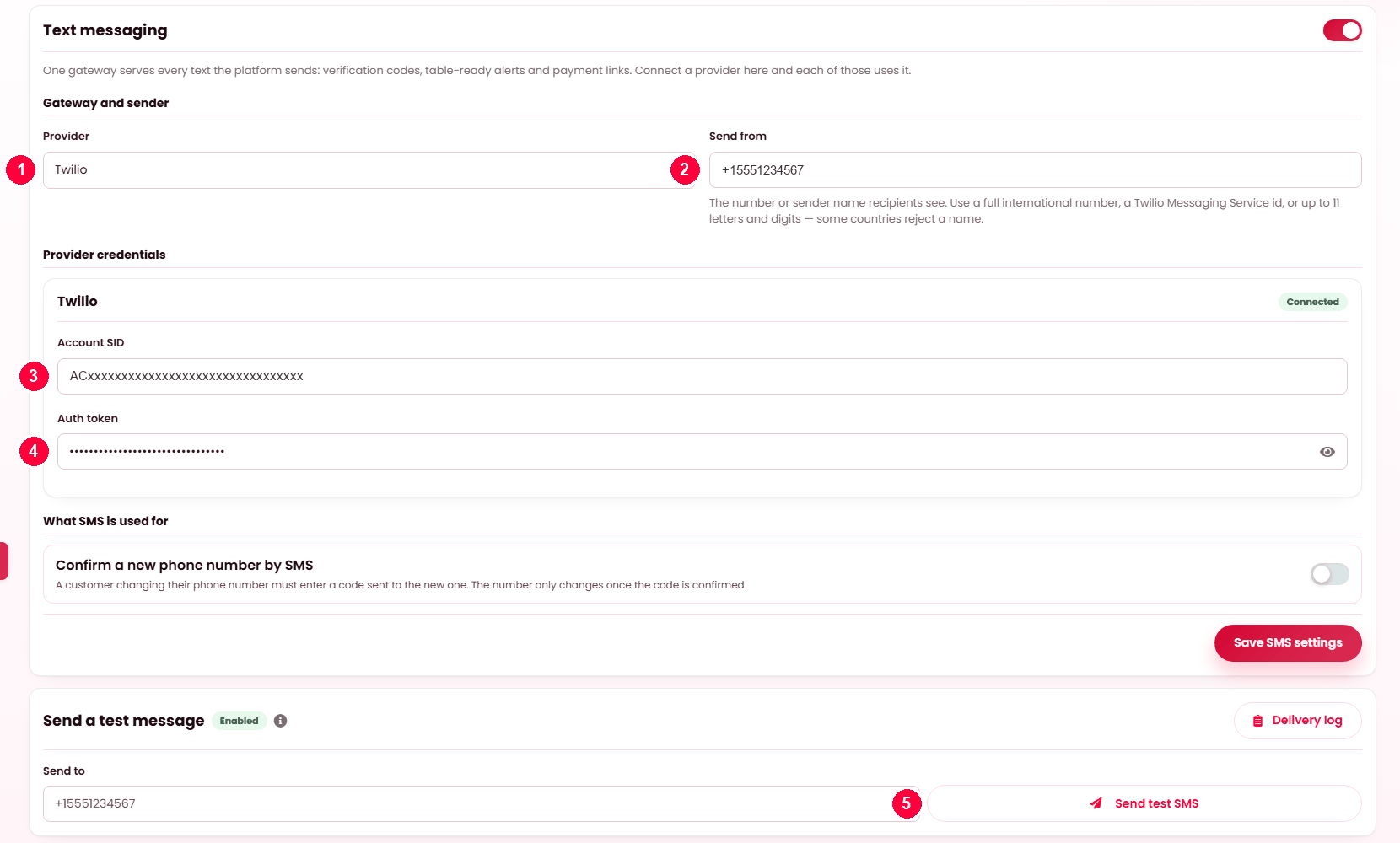
Send from +15551234567Set it up
- Provider — Twilio. Its credential fields appear when you pick it.
- Send from — the number or sender name recipients see.
- Account SID.
- Auth token.
- Send test SMS before you rely on any of this.
One more switch: Confirm a new phone number by SMS — a customer changing their number must enter a code sent to the new one.
The log
Every attempt, with counts across the top: delivered, rejected, never sent, delivery rate and billed segments. Segments are what you actually pay for — a long message is split into several — so a rising bill with flat message counts means your wording grew.
Three states, and the difference matters
| Status | Meaning | Fixed |
|---|---|---|
| Delivered | The provider accepted it. | — |
| Rejected | The provider was called and said no. | At the provider — credentials, sender, account balance. |
| Never sent | The provider was never called. | Here, in Settings. |
Never sent is the useful one, because the platform explains itself: SMS switched off, no credentials saved, no sender set, the number missing its country code, the number containing something that is not a digit, or the message empty or too long. Each is stated in those words on the row.
Filter by status or purpose, search by number, message or the provider's own reference, and Prune old entries. Each message carries the provider reference, so a dispute can be taken to the provider with a number they recognise.
When it doesn't work
Everything says "Never sent"
Read the reason on the row — it names the missing piece. Usually SMS is off or no credentials are saved.
Everything says "Rejected"
The provider refused. Check the credentials, the sender number is one your account may send from, and the account has credit.
One message says the credentials were already rejected
After the provider refuses your credentials once, later messages are skipped rather than retried — there is no point paying for repeated rejections. Fix the credentials and the next message goes.
A number is refused for its country code
Numbers need their country code, starting + or 00. A local-format
number is ambiguous and is refused rather than guessed at.
The bill is higher than the message count suggests
Check billed segments. Long messages cost several each.