Upsell
Pairings that suggest a second dish while the customer is still ordering, with or without an offer attached.
Restaurant → Upsell
Add a pairing
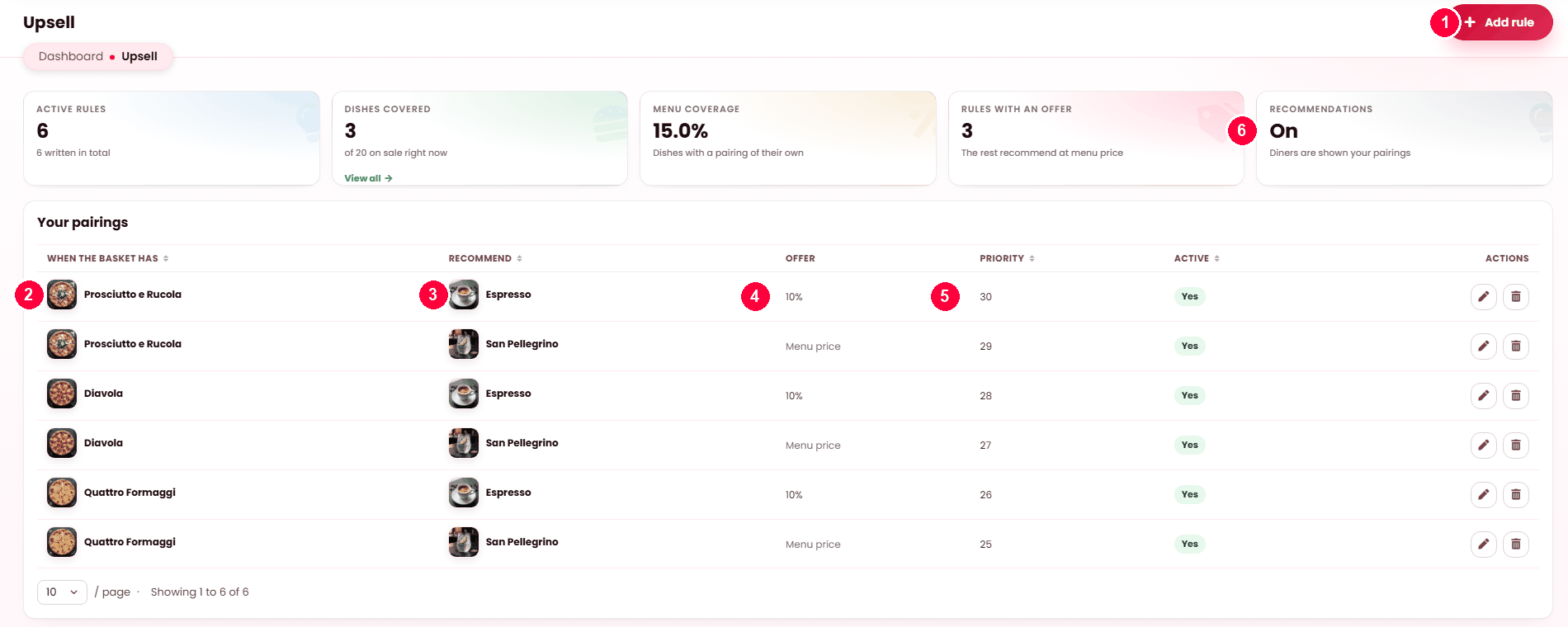
- Add rule.
- When the basket has — the dish that triggers it.
- Recommend — the dish suggested alongside.
- Offer — a discount such as 10%, or Menu price for no discount.
- Priority — higher wins when several rules match the same basket.
- Recommendations — the master switch. Off, and no pairing is shown to anyone.
One trigger dish can carry several pairings; the tiles above tell you how much of your menu is covered.
What a pairing is
One rule: when the basket has this dish, recommend that one. Optionally at a discount. It is the digital equivalent of asking whether they would like a side with that, and it works for the same reason — the moment is right and the question is specific.
Writing one
| Field | Notes |
|---|---|
| When the basket has | The dish that triggers the suggestion. |
| Recommend this dish | What to suggest. Pick something that genuinely goes with it. |
| Offer | A fixed amount off, a percentage off, or nothing — in which case it is recommended at menu price. |
| Priority | Which suggestion wins when several rules match. Higher goes first. |
| Active | Off keeps the rule and stops it running. |
The four figures
| Figure | Meaning |
|---|---|
| Active rules | How many are running, against how many you have written. |
| Dishes covered | How many of your on-sale dishes trigger a suggestion. |
| Menu coverage | The same as a proportion. |
| Rules with an offer | How many discount; the rest recommend at menu price. |
Coverage is the one to watch. A handful of rules on your best sellers covers most baskets — chasing 100% is not the goal.
The recommendation engine
Your platform decides whether recommendations run at all, and the screen tells you which of three states you are in:
| State | What customers see |
|---|---|
| Your rules | Your pairings, as written. |
| Automatic | The platform chooses, until you write a rule of your own — yours then wins. |
| Off | Nothing is suggested. Your rules are kept, not deleted. |
Rules that stop working
The list flags them rather than failing silently:
- Dish removed — a dish the rule referenced no longer exists.
- Not on sale — this rule is skipped — the recommended dish is off sale, so nothing is suggested.
The second is the common one, and it is worth checking after any menu change.
Writing good pairings
- Pair with what people actually buy together, not what you wish they would.
- A small discount on a high-margin side beats a large one on a main.
- Start with your five best sellers. That is most baskets covered for five rules' work.
When it doesn't work
Nothing is being suggested
Check the engine state at the top. Off means nothing runs whatever you wrote.
A rule is marked skipped
The dish it recommends is off sale. Either put it back on sale at Restaurant → Menu → Dishes, or edit the rule here to recommend something else.
The wrong suggestion appears
Two rules match and the other has higher priority.