Menu dishes
Adding a dish, giving it choices and ingredients, and using the filters that find the ones costing you money.
Restaurant → Menu → Dishes
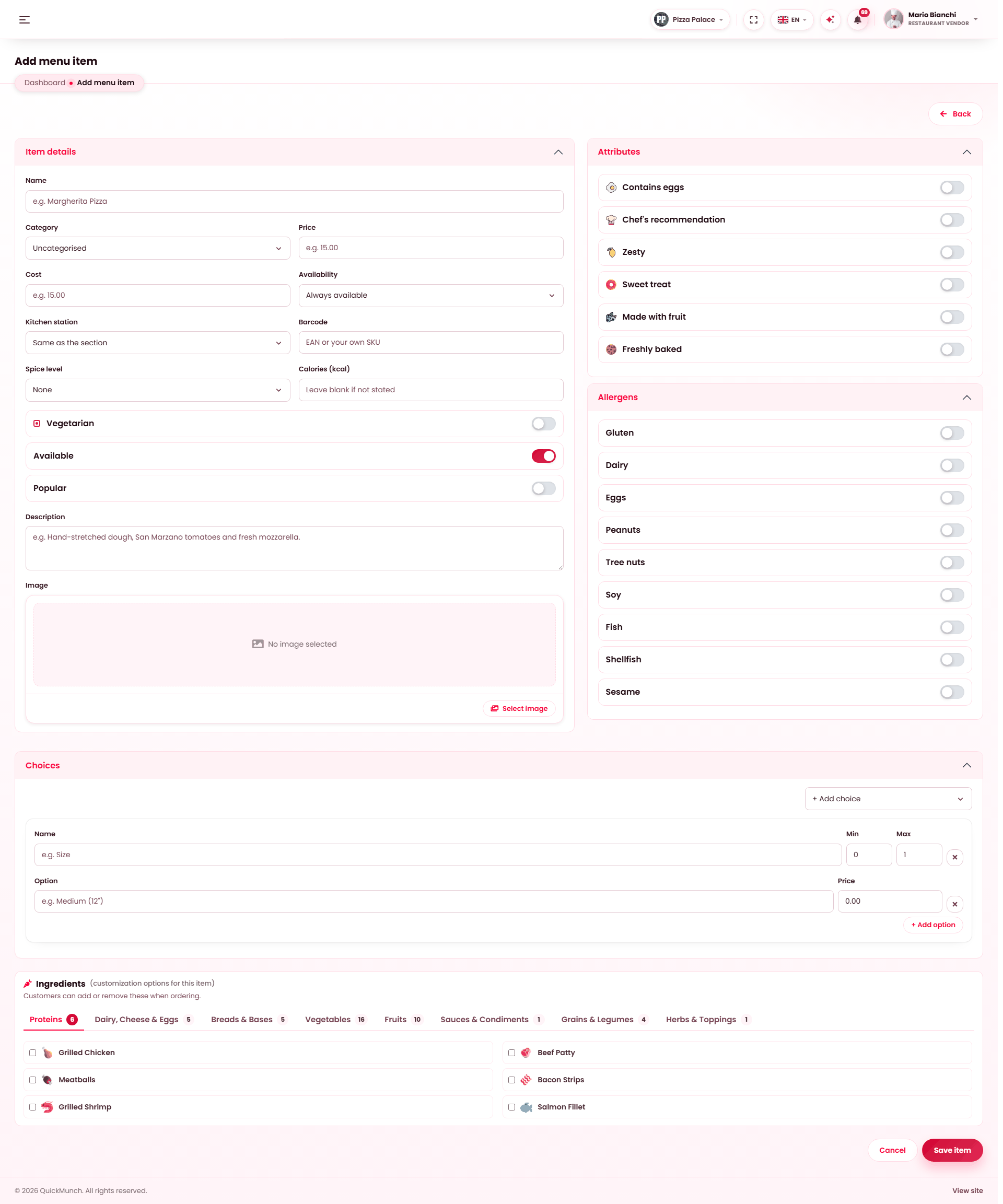
Add dish opens this form: name, description, price and photo on the left; category, availability, dietary flags, options and stock on the right. Everything except name and price is optional.
Every dish, its category, price and whether it is on sale.
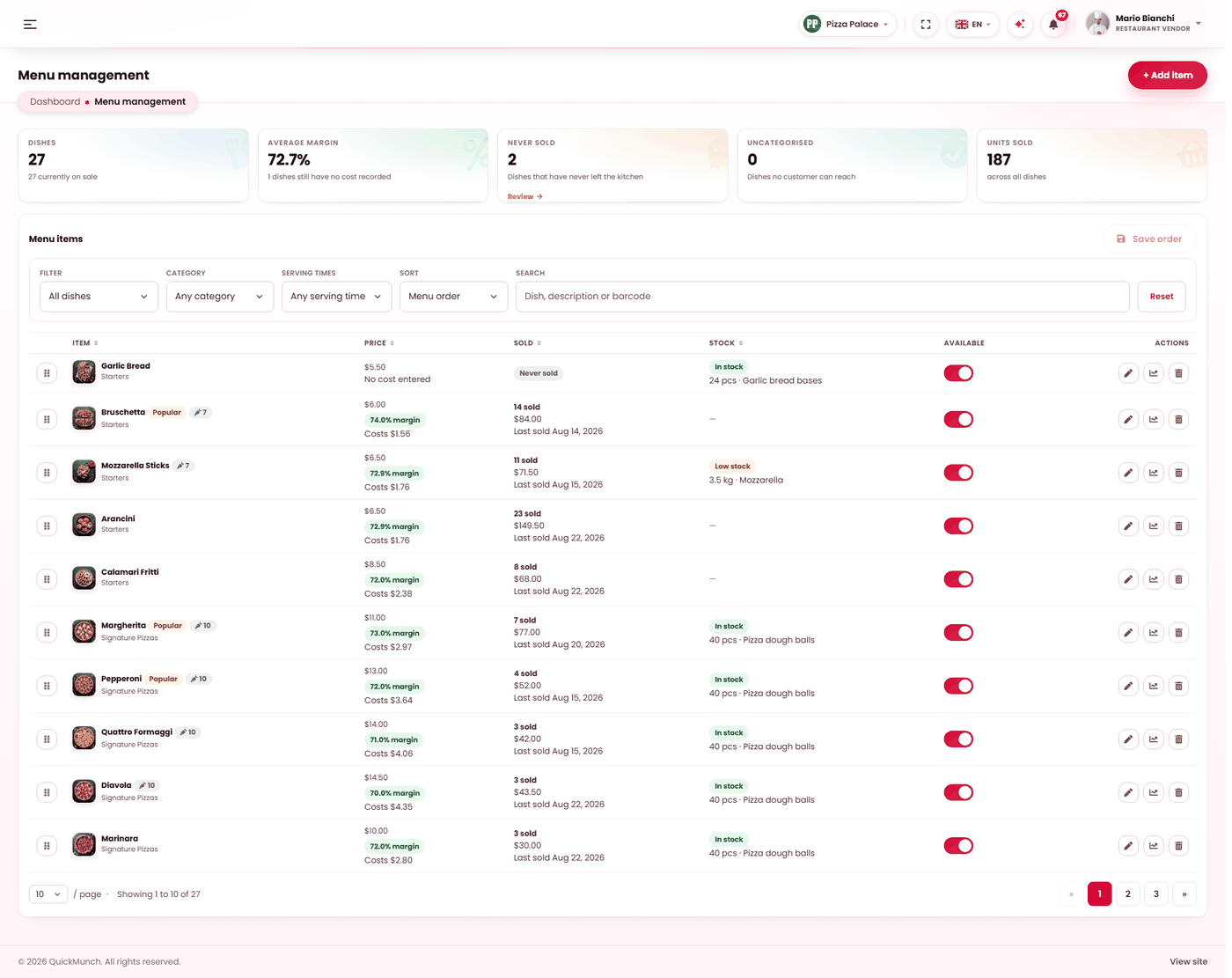
Three tabs
Dishes is this page. Categories is how the menu is divided — see Menu categories. Import brings a menu in from elsewhere — see Import menu.
Adding a dish
| Field | Notes |
|---|---|
| Name | Required. What the customer reads. |
| Description | Worth writing. It is the difference between a dish being ordered and being scrolled past. |
| Price | Read against your tax setting — see Restaurant profile. |
| Cost | What it costs you. Optional, and it drives every margin figure you will ever look at. |
| Category | Which section it sits in. A dish with none is invisible to customers. |
| Image | From your media library. |
| Availability | On or off sale. Off keeps the dish and hides it. |
| Serving time | Its own, or Always available, or inherited from its category. |
| Kitchen station | Where it is cooked, or Same as the section. |
| Calories, barcode | Optional. Barcodes matter if you scan at a till. |
Attributes and allergens
Mark a dish popular, vegetarian or spicy (with a mild / medium / hot level), and tick its allergens. Both lists come from your platform, so "vegetarian" means the same thing at every restaurant and an allergen filter can be trusted across the whole site.
Choices
A choice is a decision the customer must make — Size, Base, Cooking. Each has a name, a min and a max, and its options with their own prices.
- Min 1, max 1 — they must pick exactly one. A size.
- Min 0, max 3 — they may pick up to three, or none. Extra toppings.
Ingredients
Ingredients are what a customer adds or removes when ordering. Each carries two settings that decide how it behaves:
| Setting | Effect |
|---|---|
| Default | It is on the dish already. Customers can take it off. |
| Removable | Whether they are allowed to take it off at all. |
| Extra price | What adding it costs. Blank means free. |
"Default and not removable" is how you record something that is simply in the dish. The ingredient list itself is your platform's — see Menu (platform).
How it reaches the customer
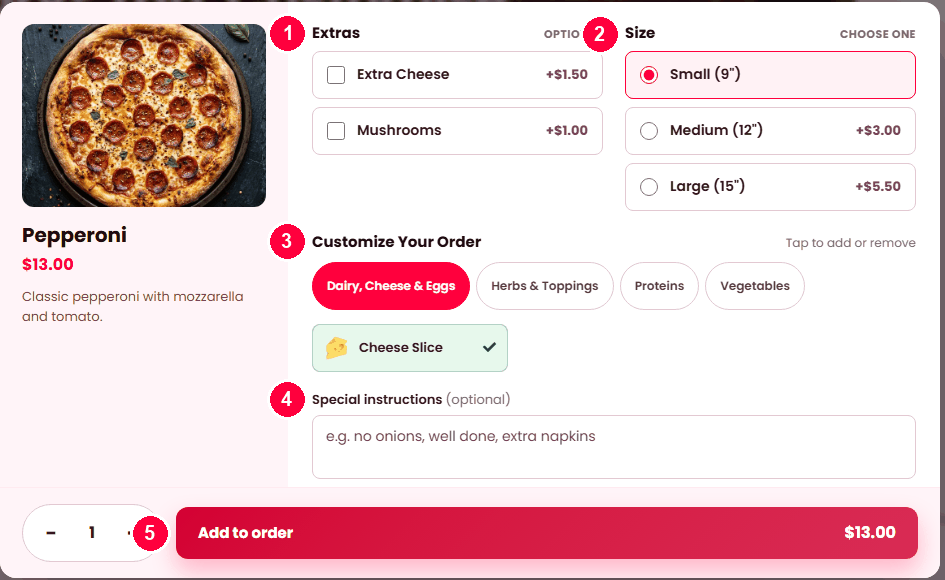
What you set up above is what the customer is shown when they open the dish — on the storefront, on a kiosk and on a QR table order alike.
- Extras — a choice with min 0, so it is optional and each option carries its own price.
- Size — a choice with min 1, max 1, so one must be picked. It is marked Choose one.
- Customize your order — your ingredients, grouped. A default one shows ticked and can be tapped off if it is removable.
- Special instructions — free text, always available.
- Add to order, priced for what was chosen.
A dish with no choices and no ingredients opens with just the quantity and instructions.
The seven filters
These are the reason to visit this screen when you are not adding a dish. Each answers a question you should be asking monthly:
| Filter | Finds | Why it matters |
|---|---|---|
| On sale / Off sale | What is and is not selling right now. | Off-sale dishes accumulate quietly. |
| Marked popular | What you flagged. | Check it still matches what actually sells. |
| Never sold | Dishes with no sales at all. | Dead weight. Either fix the description and photo, or remove it. |
| Missing a cost | Dishes with no cost recorded. | Every one is a hole in your margin reporting. |
| No category | Dishes filed nowhere. | Customers cannot see these at all. Check this filter after any import. |
| Low or out of stock | Tracked dishes at or below their threshold. | What to fix before service — see Inventory. |
Filters combine with a chosen category and serving time, so "starters served at lunch that have never sold" is one view.
The eleven sorts
Menu order, best selling, worst selling, revenue, thinnest margin, recently sold, category, serving time, name, price, recently added.
Thinnest margin is the one to know. It ranks by what you actually keep, so a popular dish you are barely making anything on rises to the top — which is not visible from a price list. Recently added answers "what did that import actually add?".
Per-dish figures
Each dish opens to its own analytics: units sold, revenue, margin and when it last sold. That is the case for or against keeping it.
Export
Export CSV writes the filtered list. The same shape comes back in through Import menu, so a bulk price change can be done in a spreadsheet.
When it doesn't work
A dish is not on my storefront
In order: is it on sale, does it have a category, is its serving time covering now, and is it in stock? "No category" is the one people miss.
Margin is blank
No cost recorded. Use the Missing a cost filter to find them all at once.
Customers cannot remove an ingredient
It is not marked removable.
A choice lets customers pick nothing
Its minimum is 0. Set it to 1 to make the choice compulsory.
The dish shows out of stock and I have plenty
Its linked stock item says otherwise. Correct it in Inventory, or switch tracking off for that item.