Inventory
Stock items linked to dishes, counted down by sales, with a movement history that explains every change.
Restaurant → Inventory
Add stock, and keep it right
- Add stock item — name it, choose its unit (pcs, kg, l), and link it to the dishes that use it.
- Stocktake — count everything and set the real figures in one pass.
- Movement on a row — record a delivery in, or a waste write-off out. This is how a number changes day to day.
- Low at — the reorder level. At or below it the item counts as Low stock and you are alerted.
- Tracked — off means it is listed but not counted down by orders.
- Waste log — every write-off, who made it and why.
Cover works out how many days are left from what you actually use, so “0.7 days left” is a warning you can act on before service.
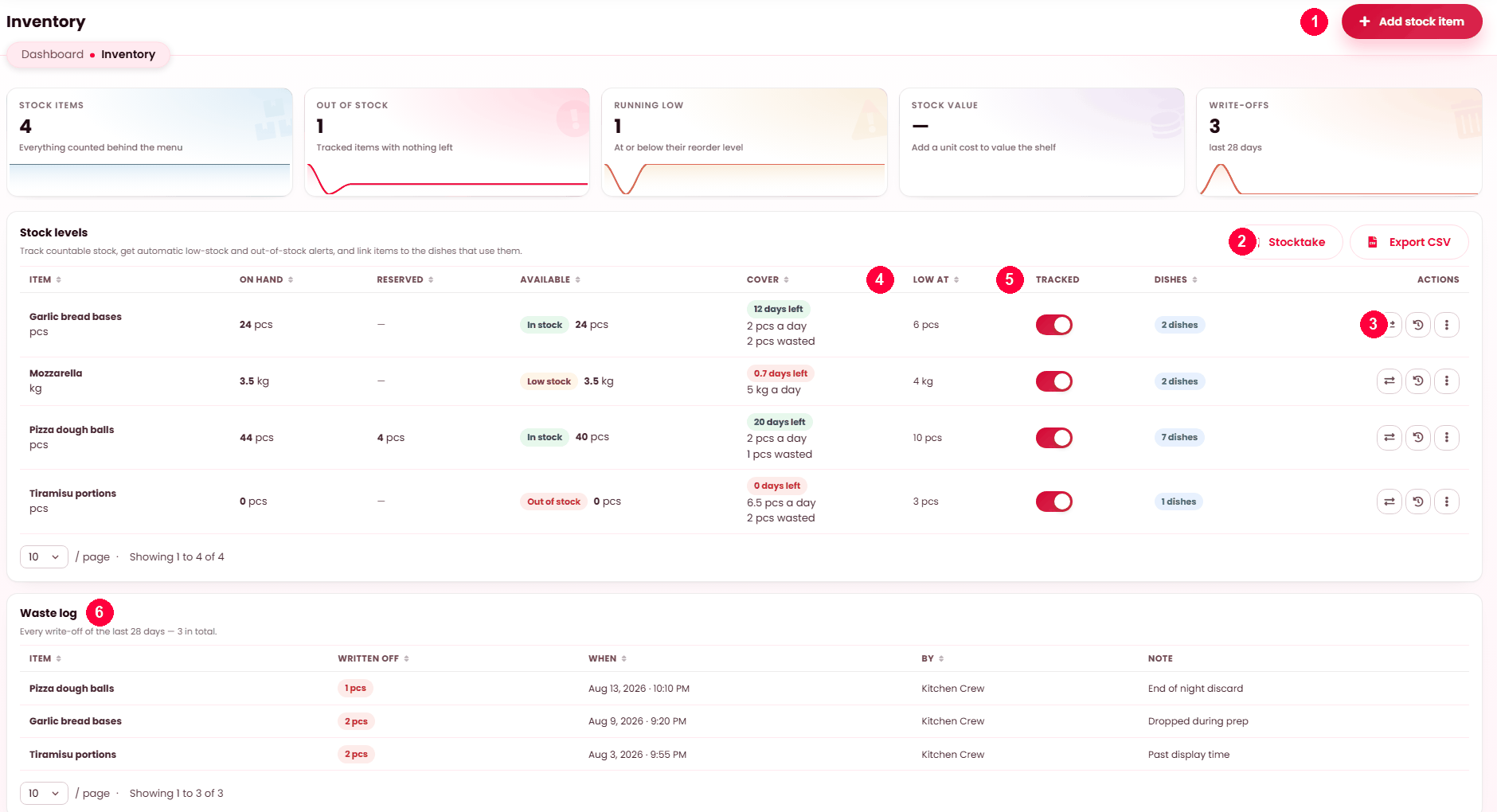
Stock levels, low-stock warnings and what is off the menu.
Stock items, not dishes
You track ingredients and goods — tomatoes, bottles of house red, boxes of chips — and link them to the dishes that consume them. A sale then draws down the stock item, and one item running out can take several dishes off sale at once.
Adding a stock item
| Field | Notes |
|---|---|
| Name | Up to 120 characters. |
| Unit | kg, pcs, L — whatever you count it in. It appears everywhere the quantity does. |
| Opening quantity | What you have now. Written as the first movement, so the history starts honestly. |
| Low stock threshold | At or below this, the item reads Low stock. 0 switches the warning off. |
| Track stock | Off, the item is kept but nothing counts down. |
Tracking can also be flipped straight from the list, without opening the item.
The four quantities
| Column | Meaning |
|---|---|
| On hand | What you physically have, including what is committed to live orders. |
| Reserved | Committed to orders not yet finished. |
| Available | On hand minus reserved — what can still be sold. This is the figure that drives availability, and it carries the In stock / Low / Out badge. |
| Cover | How long it lasts at your recent rate of use, with that rate beside it. Reads No movement in 28 days for items nothing is drawing on. |
| Low at | Your threshold. |
| Dishes | How many dishes draw from this item. |
Movements
Stock changes through an immutable movement history — entries are added, never edited. Each has a reason:
| Reason | Recorded when |
|---|---|
| Sale | A dish using it was sold. Automatic. |
| Restock | A delivery arrived. You record it. |
| Waste | Something was thrown away. Record it — waste you do not record is margin you cannot explain. |
| Adjustment | A stock count corrected the figure. |
| Void | A sale was cancelled and the stock came back. |
Because nothing is edited, the history always explains how a number got where it is. Your own reason list adds detail to adjustments — see Reasons.
The figures above the list
| Figure | Meaning |
|---|---|
| Stock items | Everything counted behind the menu. |
| Out of stock | Tracked items with nothing left. |
| Running low | At or below their reorder level. |
| Stock value | What you hold is worth. It states how many of your items have a unit cost, so a partial figure is never mistaken for a complete one. |
| Write-offs | What you wasted over the last 28 days. The figure most restaurants have never seen. |
The Cover column is the ordering figure — "three days left" is more actionable than "18 kg", and it is worked out from what you have actually been using.
Export
Export writes item, on hand, reserved, available, low-at and how many dishes depend on it. That last column is the one to sort by before a stock count: an item feeding nine dishes matters more than one feeding a single special.
When it doesn't work
A dish went off sale unexpectedly
A stock item it depends on hit zero. The Low or out of stock filter on Dishes shows which.
Nothing counts down
On Restaurant → Inventory, switch Tracked on in that item’s row. If it is already on, no dish is drawing from it — open the item and link the dishes that consume it.
Nothing warns me before things run out
Its Low stock threshold is 0, which switches the warning off. Open the item on Restaurant → Inventory and set a real number.
Available does not match the shelf
Compare with On hand — the gap is reserved stock committed to live orders. If On hand itself disagrees with the shelf, record an adjustment; the discrepancy is worth having in the history rather than quietly corrected.
Stock value is zero
No unit cost recorded on the items.