Search
How customers find a restaurant: the filter bar you arrange, autocomplete, and how many results fill a page.
Admin → Settings → Search
The filter bar
Ten controls ship on the restaurant listing, and this screen decides which appear and in what order — drag them into the arrangement you want.
Leave the arrangement blank and the shipped order applies.
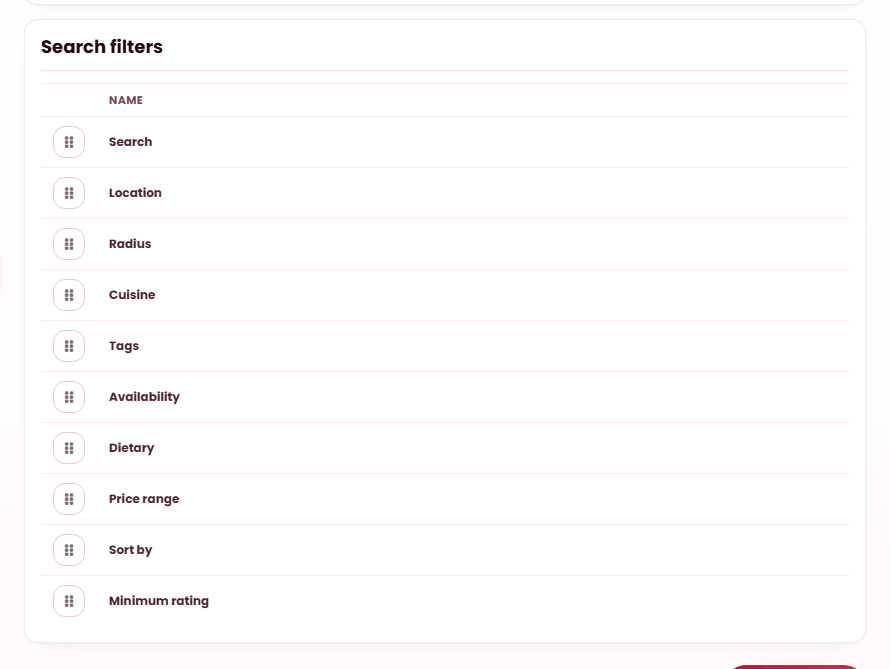
| Control | Lets a customer |
|---|---|
| Search | Type a name. |
| Location | Choose a city or area. |
| Radius | Set how far they will travel. |
| Cuisine | Browse by cuisine — from Classifications. |
| Tags | Filter by food type or store type. |
| Availability | Show only what is open now. |
| Dietary | Filter by dish attributes — from Menu. |
| Price range | Cap what they will spend. |
| Sort by | Reorder the results. |
| Minimum rating | Hide anything below a star threshold. |
A filter needs data behind it
Every one of these reads records you own. Dietary finds nothing unless restaurants have tagged dishes; Cuisine is thin until your cuisine list is real; Minimum rating is meaningless before you have reviews. A filter offering an empty result set is worse than no filter — see Classifications.
Autocomplete & paging
- Autocomplete — suggest matching restaurants as a visitor types.
- Minimum characters — how much they must type first. 2 to 6.
- Results shown — how many suggestions appear. 1 to 20.
- Restaurants per page — how many appear before paging.
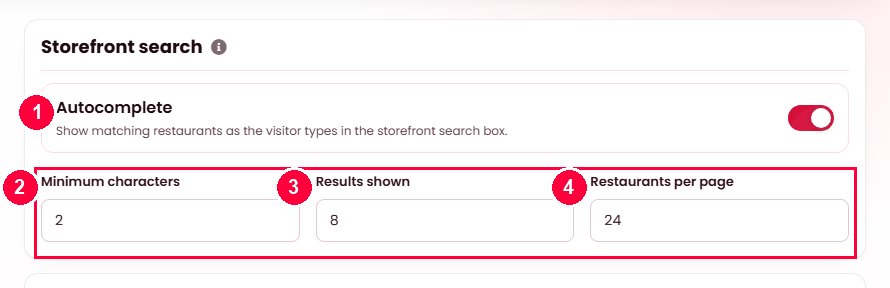
Two or three characters is the usual minimum; six or eight results is plenty. Twelve to twenty restaurants per page is the ordinary range.
When it doesn't work
A filter finds nothing
The data behind it is missing rather than the filter being broken. Dietary reads dish attributes, which restaurants apply per dish from the list at Admin → Menu → Attributes; Cuisine reads each restaurant’s cuisine, set at Admin → Restaurants.
A filter I removed is still on the page
Save, then reload the storefront. The arrangement is read when the listing renders.
Autocomplete shows nothing
The visitor has typed fewer than the minimum characters, or nothing matches. It suggests restaurants, not dishes.
Results feel wrong
Check the sort control is present — without it, customers cannot reorder and are stuck with the default.