Sponsored placements
Buying a slot on your platform's storefront — where the slots are, what they cost, and whether yours is working.
Restaurant → Campaigns
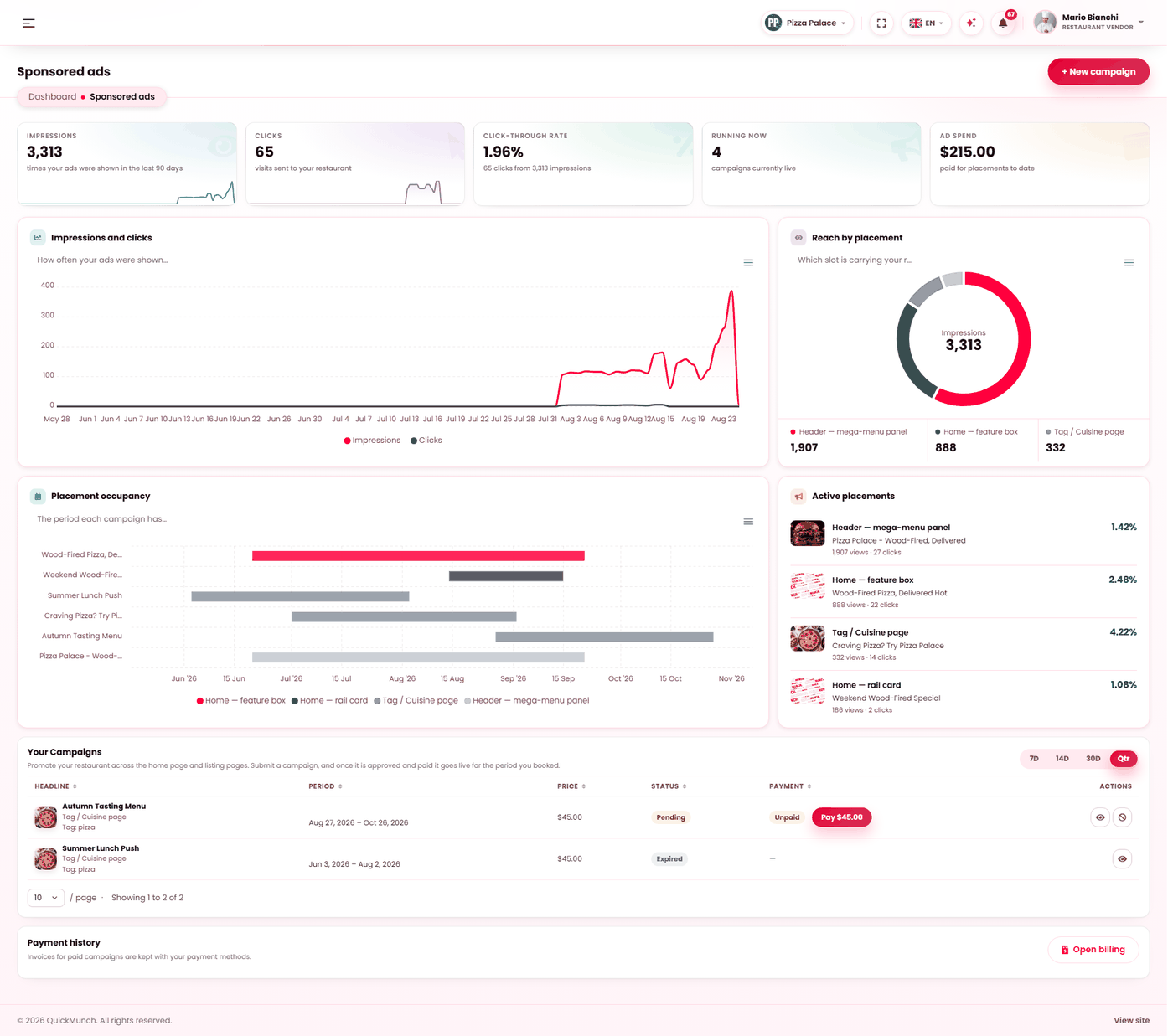
What you are spending, what it returned, and every campaign with its status.
- Pick the placement and the dates.
- Choose what it promotes — the restaurant or one dish.
- The preview shows exactly how it will appear.
- Submit it for approval.
A placement is bought, not applied for
Your platform publishes the slots and their monthly price. You choose one, pay, and it runs. There is no application queue — it is sold the same way a plan is sold.
A slot your platform has priced at nothing goes live immediately, with nothing to pay.
The seven placements
| Placement | Where it appears |
|---|---|
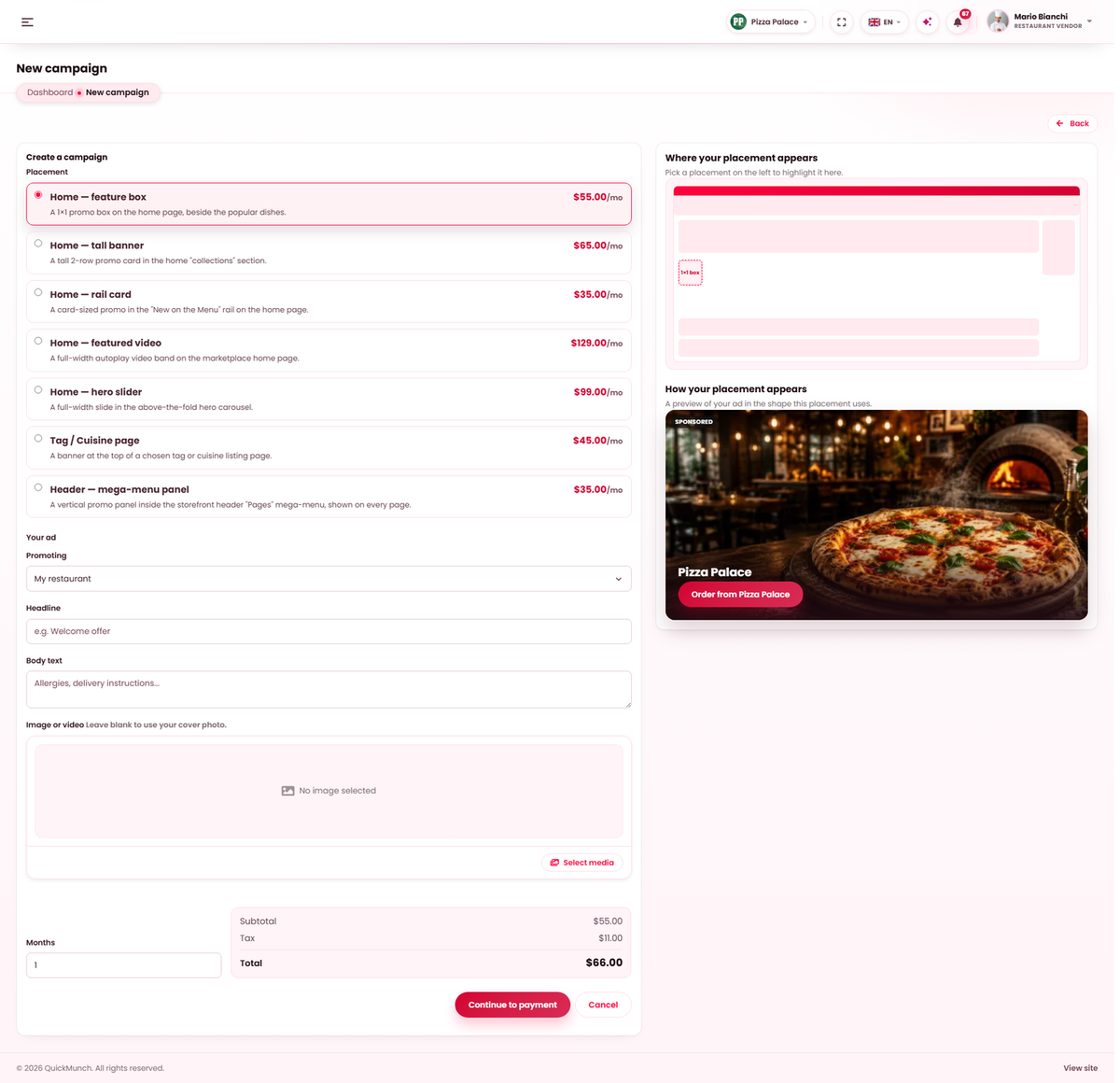
| Home — hero slider | A full-width slide in the carousel above the fold. The most prominent thing on the site. |
| Home — featured video | A full-width autoplay video band on the marketplace home page. |
| Home — tall banner | A tall two-row card in the collections section. |
| Home — feature box | A 1×1 promo box beside the popular dishes. |
| Home — rail card | A card in the "New on the Menu" rail. |
| Header — mega-menu panel | A panel inside the header menu, seen on every page. |
| Tag / Cuisine page | A banner at the top of one chosen listing page. |
A map beside the list highlights where each one sits, so you are choosing a position on a page rather than a name.
Creating one
- Pick the placement. The preview shows your ad in that slot's real shape.
- For a listing banner, choose whether you are targeting a tag or a cuisine, then which one.
- Write the headline and body text.
- Add an image or video. Leave it blank and your cover photo is used.
- Choose what you are promoting — your restaurant, or something specific.
- Choose how many months. The estimated total updates as you do.
- Continue to payment, by card or PayPal.
Until it is paid the campaign sits awaiting payment and shows nothing.
Reading whether it worked
| Figure | Meaning |
|---|---|
| Impressions | Times your ad was shown. |
| Clicks | Visits sent to your restaurant. |
| Click-through rate | Clicks as a share of impressions. The quality measure. |
| Running now | How many campaigns are live. |
| Ad spend | What you have paid for placements to date. |
Three charts: delivery day by day, reach by placement (which slot is carrying your reach), and placement occupancy (the period each campaign has booked).
Managing them
Active placements shows what is running now with its views and clicks. A campaign can be cancelled, which asks first. Every payment produces an invoice, kept with your payment methods.
When it doesn't work
My campaign is not showing
It is awaiting payment, or its months have run out. The list says which.
"Please choose a valid placement"
Your platform has withdrawn that slot, or it is not sold at present.
Impressions but no clicks
The creative is not earning the click. Try a specific offer over a general message — "2 for 1 on Tuesdays" outperforms "great food" everywhere it has ever been tried.
Campaigns is not in my menu
Your platform does not sell sponsored placements — see Sponsored placement (platform).