Your plan & billing
What you are on, when it renews, how to pay, and how to stop it renewing.
Restaurant → Plans
The Plans screen
- Your plan — its status, when the term ends, your commission rate and what you last paid with.
- Cancel automatic renewal — the plan runs to the end of the term, then stops.
- Next charge — the exact amount and date, tax included.
- Monthly / Annual — annual is billed once for the year at a discount.
- Upgrade — the unused value of your current term carries over as credit, and the screen states what it is worth before you commit.
- Open billing — your invoices and payment methods.
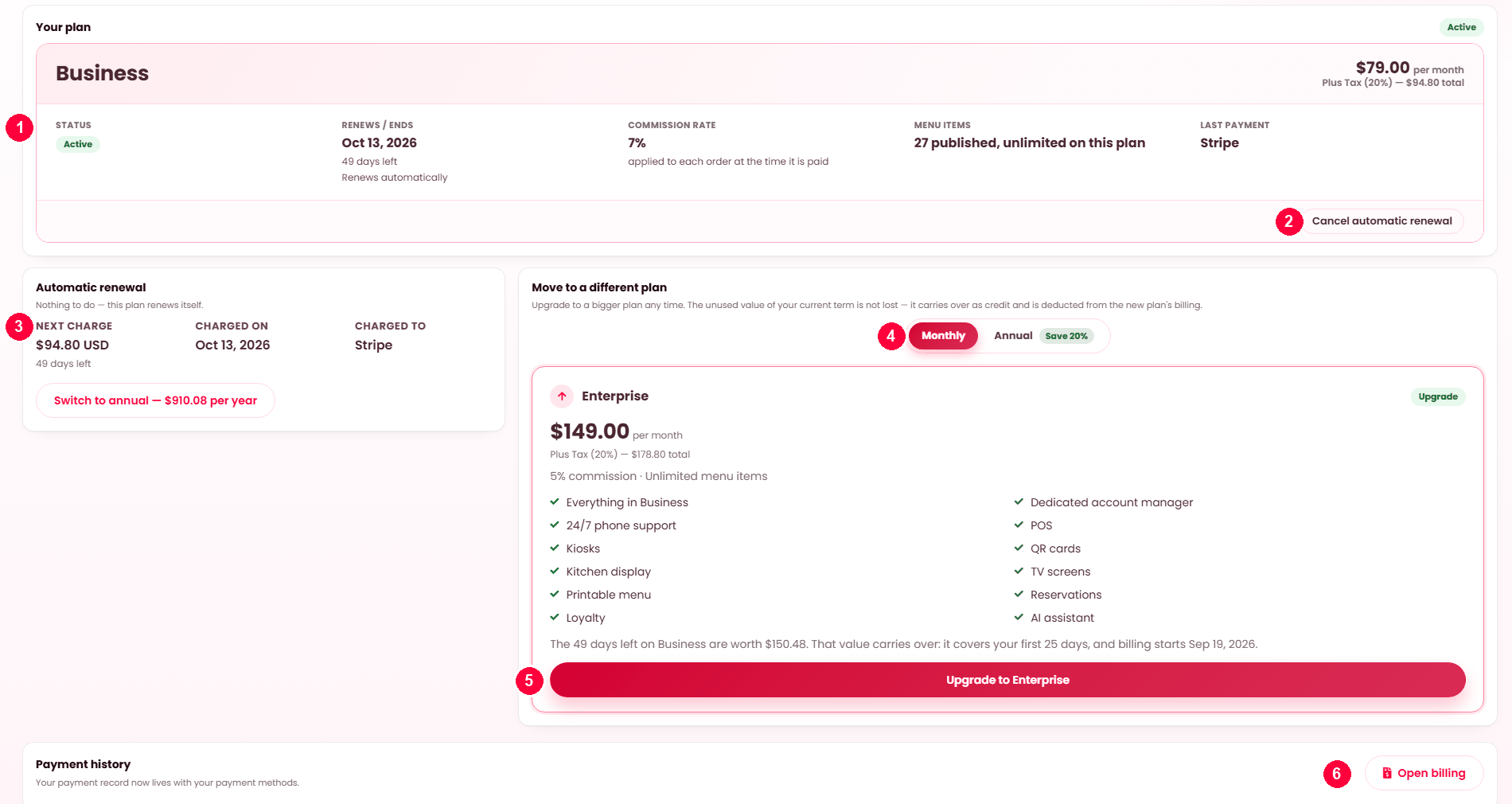
The panel at the top
| Reading | Meaning |
|---|---|
| Your plan | The plan you are on and what it costs, per month, per year or one-off. |
| Renews / ends | The date your current term runs to. |
| Renews automatically / Will not renew automatically | Whether a payment agreement is in place. This is the line to check. |
| Last payment | What you last paid and when. |
On a free plan the panel says so and there is nothing to pay. On a lifetime plan the end date reads Never.
Automatic renewal, and the two ways of paying
The distinction matters more than it first appears:
| Paying by | What happens next term |
|---|---|
| A payment agreement (card via Stripe, or PayPal) | The gateway charges you and the term renews on its own. Nothing to do. |
| A saved card, one term at a time | This term is paid. Automatic renewal stays off and you will be asked again. |
| A hosted-page gateway (Mollie, Square, Paystack, Flutterwave, PayU, SSLCommerz) | This term is paid on the provider's page. Automatic renewal stays off — these providers hold nothing that could be charged again — and you will be asked again. |
The screen labels which you have. "Will not renew automatically" is not an error — it means you paid for a term rather than set up an agreement.
Paying
The checkout tells you the amount, the currency and the cycle before you commit, including tax where it applies. The panel is headed differently depending on your position:
| Heading | Means |
|---|---|
| Activate your plan | First term. |
| Renew your plan | You are live and buying another term. |
| Reactivate your plan | Your term ran out. Starting again. |
Card details are entered with Stripe and never touch your platform's server; PayPal is approved on PayPal's own pages; a hosted-page gateway takes the payment on its own page and brings you back. A card you used before is offered as a one-click option, badged Last used.
Changing plan
The other plans are shown with what each includes. Choosing one takes you through the same checkout. The new plan's commission rate applies to new orders from then on — orders already placed keep the rate stored on them, so nothing about your past earnings moves.
Cancelling automatic renewal
Cancel automatic renewal stops the agreement at the gateway. Your plan stays active until the date you already paid for — the screen names that date when it confirms. Nothing is switched off early and nothing is refunded, because nothing is lost.
If your term runs out
The screen says so, with the date it ended and how long ago. Your plan features stop at that point; your data does not go anywhere. Renewing restores them.
Invoices
Every payment has an invoice: who issued it, who it was billed to, the plan and the period it covers, the tax, and the method it was paid with. Print saves it as a PDF for your accounts.
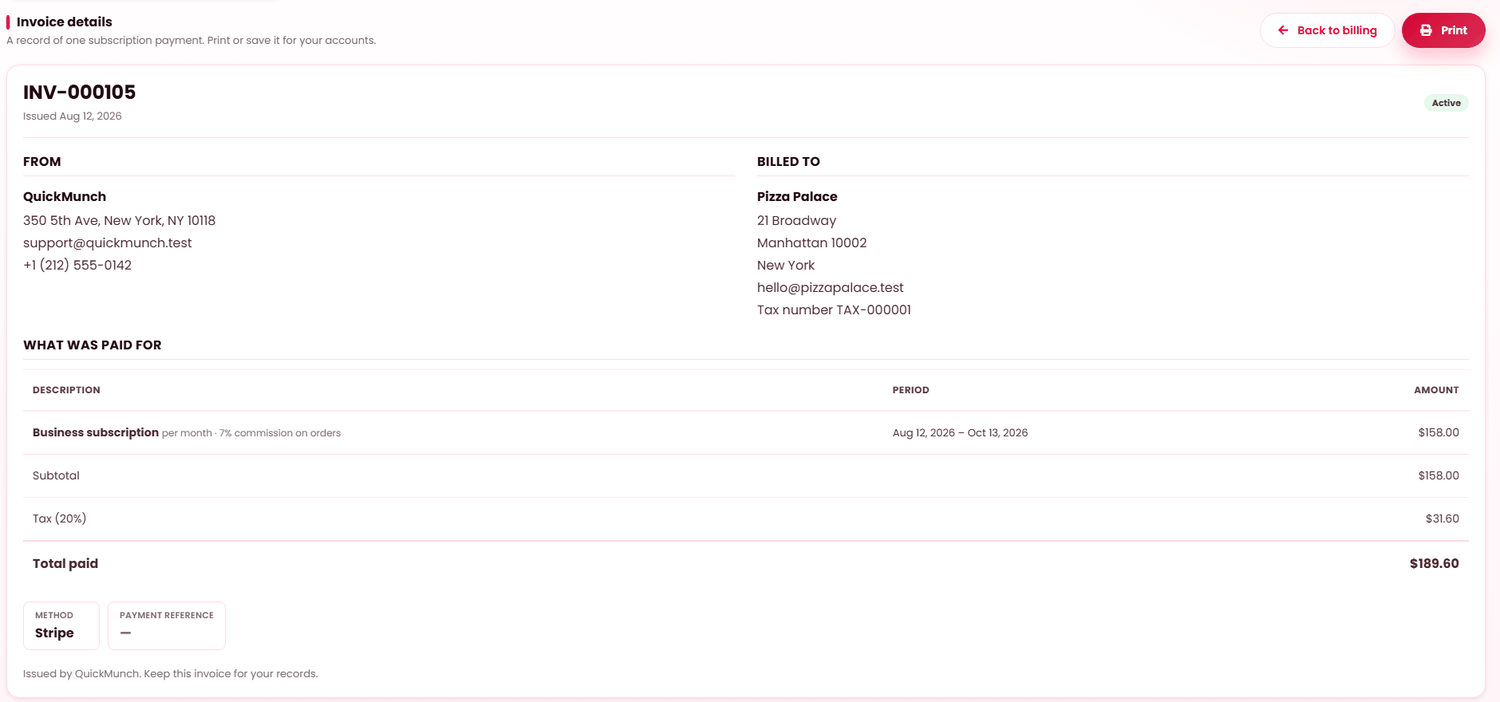
Every payment produces an invoice you can open and download, carrying your details, the tax breakdown and the term it covers. That is what your accountant needs.
When it doesn't work
It says my plan will not renew automatically
You paid for a single term with a saved card rather than setting up an agreement. Set one up at the next renewal if you would rather not think about it.
A payment method is not offered
Your platform has not enabled it. Only what they configured can be shown.
I paid but the plan is still inactive
Confirmation from the gateway usually lands within seconds and sometimes takes a minute. If it persists, the money is with the gateway and your platform operator can settle it — do not pay twice.
Branches are billed separately
Correct. Each branch is a restaurant with its own plan — see Branches.