Orders
Working the queue, assigning riders, refunding a line rather than a whole bill, and totalling a day by tender at close.
Restaurant → Orders
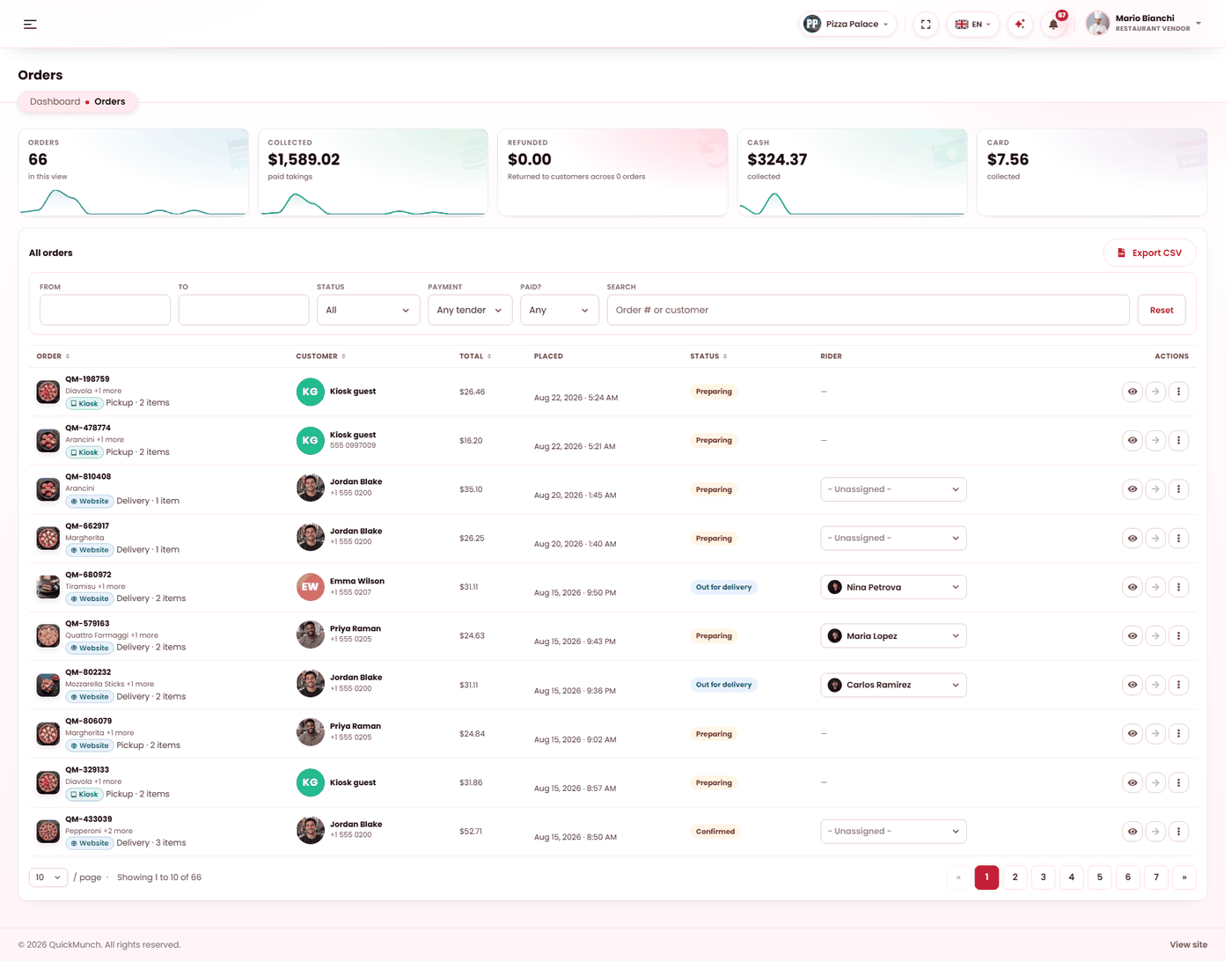
Live orders with their status, channel and total. The filters above narrow by status, date or channel.
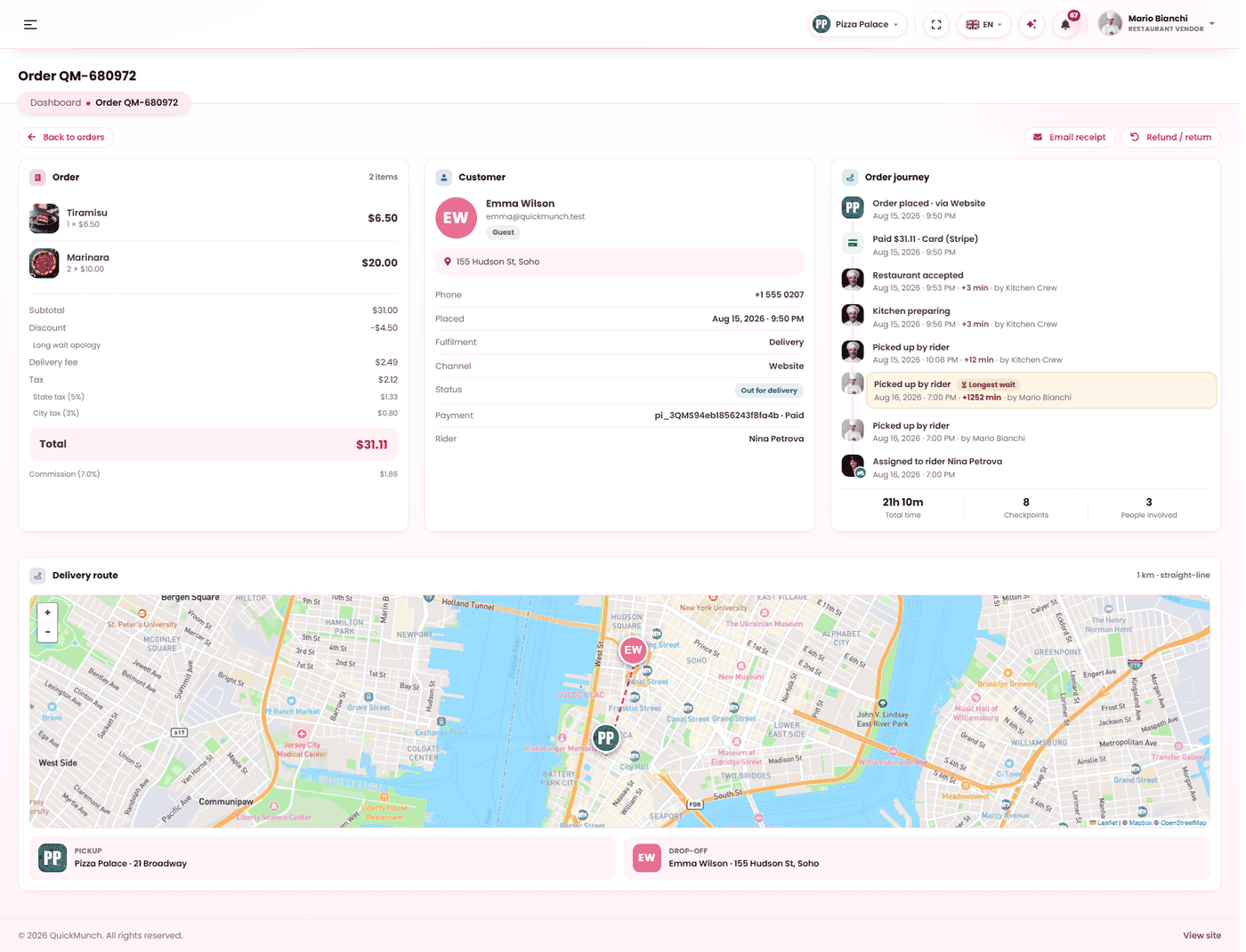
Everything about a single order — items, customer, payment, and the delivery map. Status is changed from here.
Two jobs, one screen
During service this is a queue: what is waiting, what is cooking, what needs a rider. At close it is a reconciliation tool: filter to today, read the totals by tender, and check the drawer. The filter bar is what turns one into the other.
Moving an order along
| Status | Means |
|---|---|
| Pending | Placed. Either awaiting payment or awaiting you. |
| Confirmed | You accepted it. |
| Preparing | Being cooked. |
| Out for delivery | With a rider. |
| Delivered | Finished. Reads Collected on a pickup order and Completed on dine-in — one state, wording that fits how it was fulfilled. |
| Cancelled | Stopped. |
Pickup and dine-in orders skip the delivery step entirely; the screen does not offer it.
Assigning a rider
Delivery orders show a rider selector. Only drivers currently marked available are offered — assigning an off-shift rider would send the customer a "rider assigned" notice while the food sat at the pass. A rider already assigned who has since gone off shift still shows by name, so the row never goes blank on you.
Assigning notifies the customer. Unassigning is available if you picked the wrong person.
Finding and totalling
Six filters, and they combine: date from, date to, status, payment method, payment state, and a search box. The totals strip recalculates over whatever you filtered:
- Orders and total for the filter set.
- By tender — a card per payment method, each already net of refunds.
- Refunds — money that went back out, read from the payment ledger.
The refunds card is why the strip adds up. Without it, a day that took 1,000 and returned 200 would read identically to a day that simply took 800.
Export writes the filtered list to CSV. It is a separately granted permission, so a role can work orders without being able to export customer data.
Refunding
Refunds are per line, not only per order. One wrong dish out of six is refunded as one dish; the bill stays paid and the ledger records what actually went back.
Abandoned orders
An order started with an online payment that was never completed is cleared automatically, so the queue does not fill with baskets nobody paid for. It happens as the screen loads and is throttled, so rapid refreshes do not repeat it.
Reading one order
The detail page carries the items, the money, the customer, the rider, and a timeline of every event — who accepted it, when a rider was assigned, when a refund was made. The commission rate, tax rate and payment reference are stored as they were at the time, so an order from three months ago still explains itself. Email receipt resends the receipt to the customer.
When it doesn't work
An order is stuck at pending and the customer says they paid
The confirmation from the gateway has not arrived yet. The money is with the gateway either way — this is a recording problem, not a lost payment. Tell your platform operator; it is fixed at their end.
No riders appear in the selector
None are marked available. Riders set their own availability — see The driver app.
The tender cards do not match the drawer
Check the refunds card, and check the date filter covers exactly the session you are counting.
I cannot export
Export is granted separately from working orders. Ask whoever manages your team's roles.