Branches
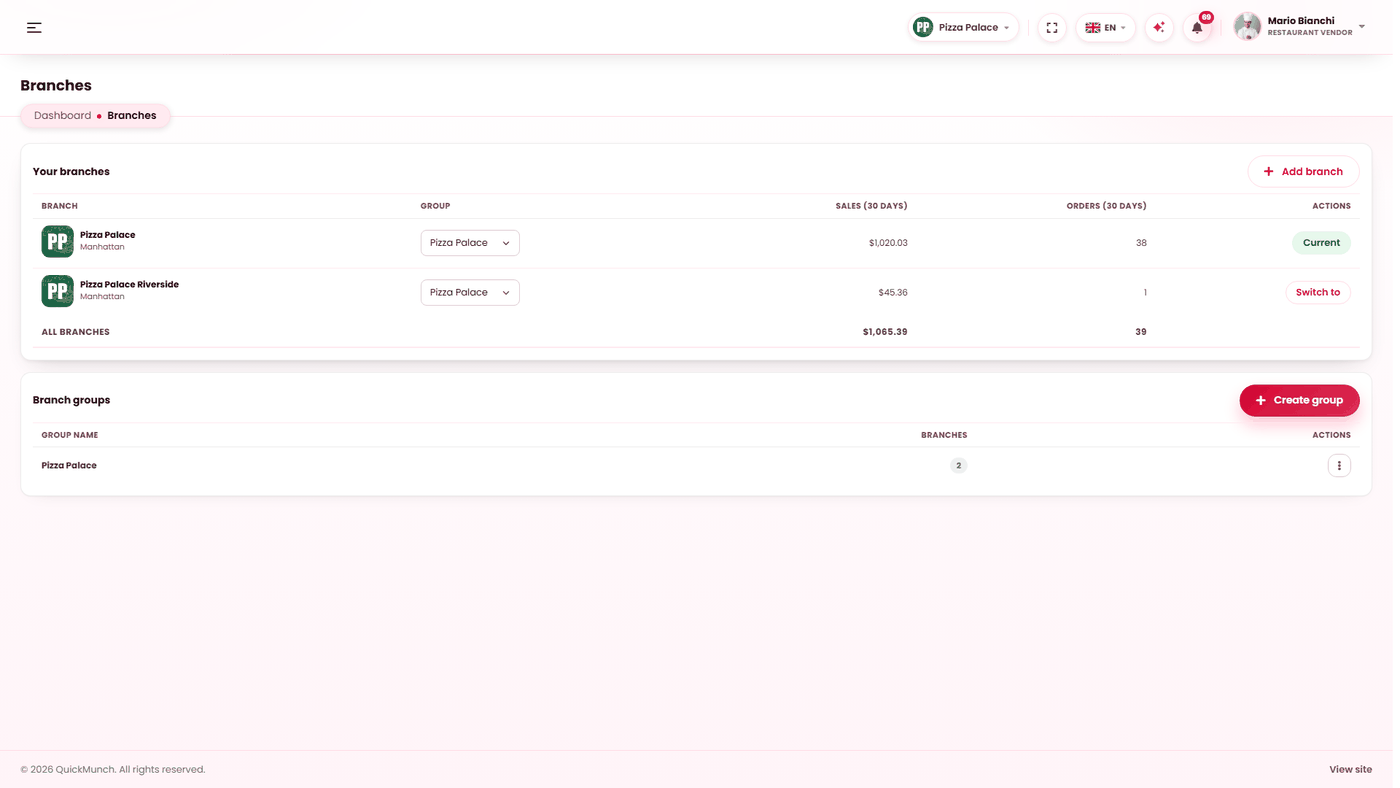
Running several venues from one login: adding a branch, switching between them, and grouping a large estate.
Restaurant → Branches
Other venues under the same owner, and the plan each is on.
What a branch is
A separate restaurant with its own menu, orders, staff and takings — that happens to share your login. Nothing is pooled: each branch trades on its own and appears on the storefront in its own right. What you gain is one place to see them all and one click to move between them.
The consolidated view
The list shows every branch with its sales and order count over the last 30 days, its group, and which one you are currently working in. A total row covers the whole estate — the quickest read on which venue is carrying the others.
Switching branch
Switch to re-points the entire dashboard at that venue. Orders, menu, staff, reports — everything you look at afterwards is that branch's. The current branch is named in the switcher, so there is always an answer to "which one am I in".
Adding a branch
- Add branch and fill in its details: name, address, city, state, postcode, phone, email, cuisine.
- Choose a group, if you use them.
- Choose the plan the branch will run on. A branch is a restaurant, so it needs its own plan — see Your plan & billing.
- Submit for approval.
The branch does not go live immediately: it is submitted, and your platform reviews it exactly as it reviewed you. That is the same gate every restaurant passes through.
Submissions are rate-limited. Adding several in quick succession asks you to wait, with the wait stated — it protects the review queue rather than doubting you.
Groups
Groups are a label for organising a large estate — by city, by region, by brand. Create one, name it, assign branches to it. Renaming a group is free; deleting one ungroups its branches rather than deleting them, which the confirmation says explicitly.
With a handful of branches, groups are unnecessary. They earn their keep somewhere around ten.
What is shared and what is not
| Shared across branches | Separate per branch |
|---|---|
| Your login and ownership. | Menu, prices and availability. |
| The branch list and groups. | Orders, customers, reviews. |
| — | Staff, opening hours, delivery settings. |
| — | Plan, subscription and payouts. |
Two branches with the same menu means building it twice — or building it once and using Import menu to carry it across.
When it doesn't work
A new branch is not on the storefront
It is awaiting approval. Your platform operator decides, the same as for any restaurant.
I am editing the wrong restaurant
Check the switcher. Everything follows the branch you are in.
I am told to wait before adding another branch
The rate limit. The message says how long.
Branches is not in my menu
Your platform does not offer multi-branch, or your plan does not include it — see Your plan & billing.