Import menu
Four ways to bring an existing menu in, a review step before anything is applied, and drafts you can leave half-done.
Restaurant → Menu → Import
Seven ways in
- Pick a source from the rail — see the table below.
- Name the import so you can find it again.
- Import menu — the dishes are read, then held for review.
Nothing reaches your live menu at this point.
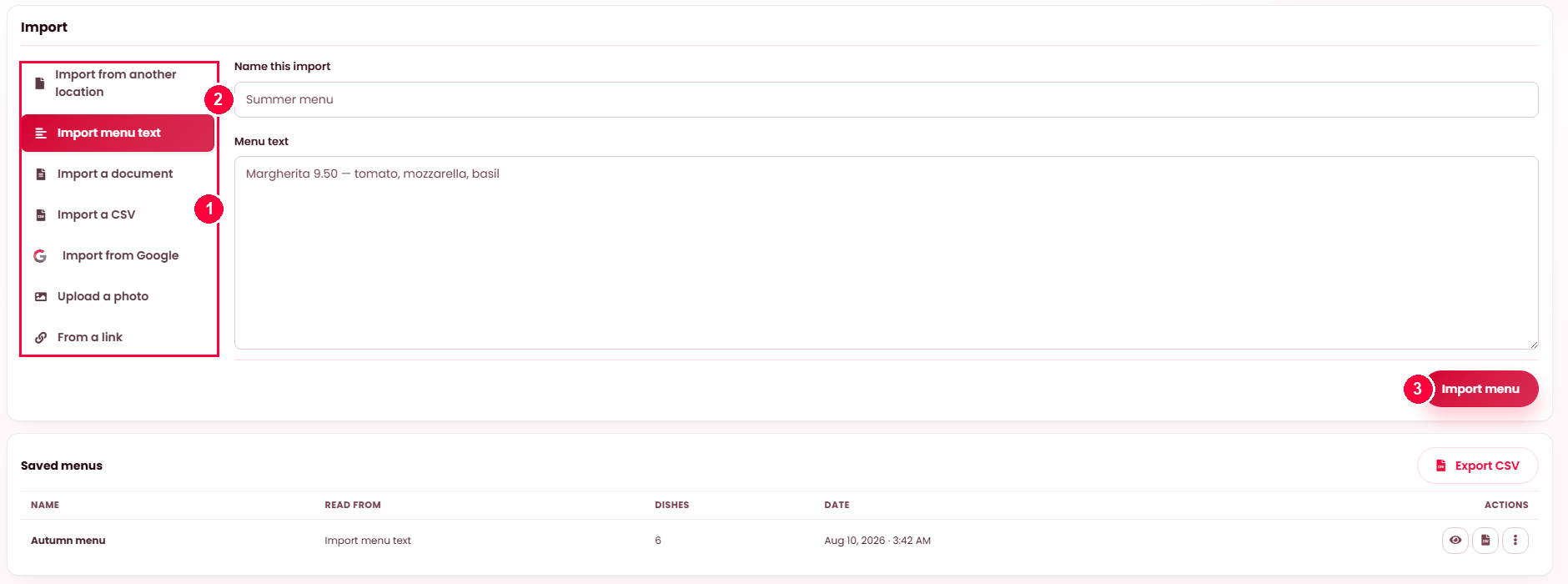
| Source | What it takes |
|---|---|
| Import from another location | A menu you already run at one of your other venues. |
| Import menu text | Pasted text — one dish per line, price and description included. |
| Import a document | A PDF or Word menu. |
| Import a CSV | A spreadsheet. Export CSV gives you the shape it expects. |
| Import from Google | Your Google Business listing — see API keys. |
| Upload a photo | A picture of a printed menu. |
| From a link | A web address where your menu already sits. |
Review before it goes live
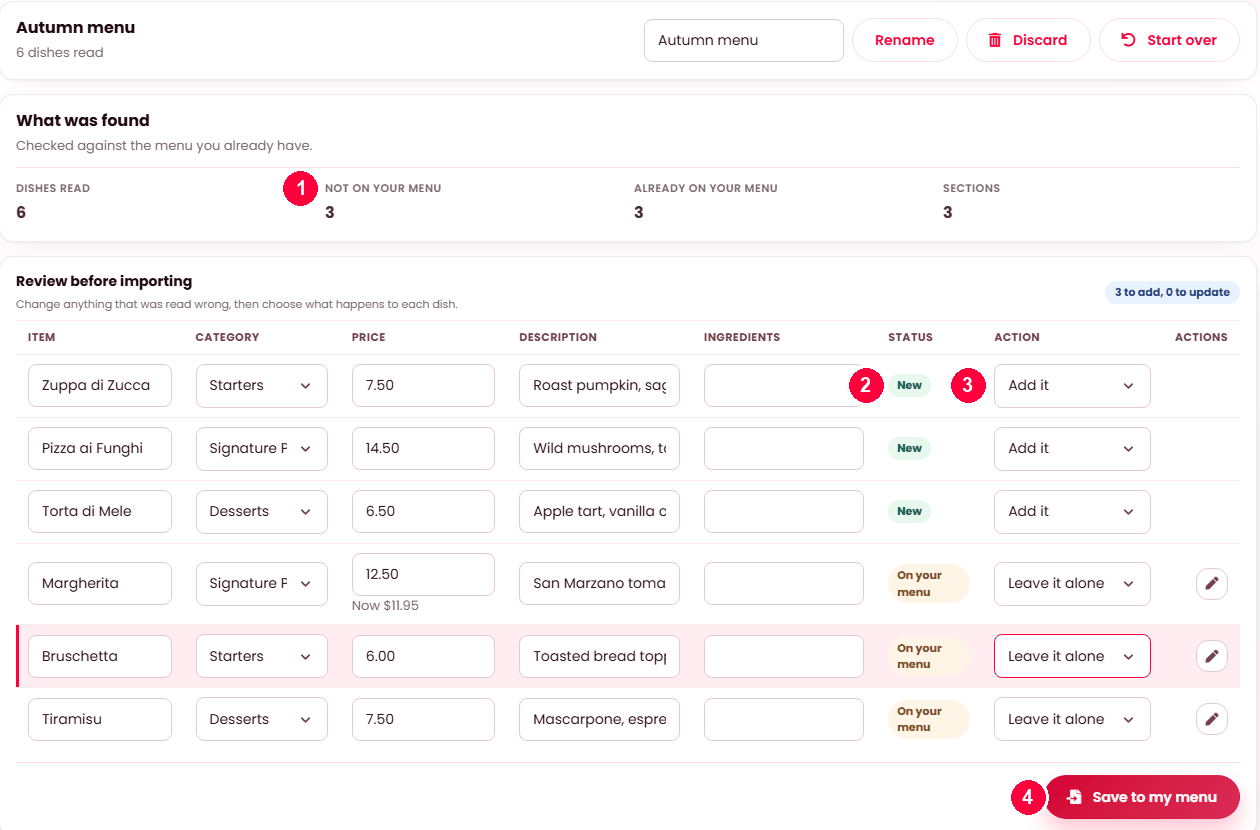
- What was found — how many dishes were read, and how many are not on your menu yet versus already there.
- Status — New, or On your menu for a dish you already sell.
- Action — Add it, update it, or Leave it alone, per dish. A price that changed is shown as "Now $11.95".
- Save to my menu applies only what you chose.
Anything read wrong can be corrected in the row first. Discard throws the import away; Start over re-reads the source.
The four methods
| Method | Give it | Best for |
|---|---|---|
| Import with AI | Pasted text, a photo of the menu or the board, a PDF or Word file, or the address of a page your menu is on. | Almost everyone. It reads a menu the way a person would. |
| Import from Google | Your own Google Business Profile. | Restaurants whose menu is already on Google. |
| Import a CSV | A spreadsheet. | Bulk edits — it exports back out in the same shape. |
| By hand | — | A short menu. Honestly quicker under about fifteen dishes. |
Nothing is applied without your review
Every method produces a draft, not a menu. You review what was read, correct it, map it to your categories, and only then apply it. That is the whole safety of the feature: a misread price is caught on a review screen rather than on your storefront.
- Read — the source is parsed into dishes.
- Name the draft, so you can come back to it. It defaults to the source and the date.
- Map — decide which of your categories each incoming section becomes.
- Review the dishes, a page at a time, editing anything that came out wrong.
- Apply — and only now does your menu change.
Drafts
Saved menus are listed with their name, what they were read from, and how many dishes they hold. Review resumes, Rename retitles, Discard throws it away. So a large menu can be worked through over several sittings.
Export to CSV exports the draft itself — useful when it is easier to correct fifty rows in a spreadsheet than on screen.
Import from Google
- Sign in with Google and connect the account that manages your business.
- Choose which business this restaurant is. Locations that cannot carry a menu on Google are marked, so you do not pick one that will return nothing.
- Read the Google menu. The screen records when it was last read.
- A listing connected on the sign-up page arrives here already attached — the dishes ticked there are on the menu from the first day, and this screen reads the listing again whenever the menu on Google changes.
Disconnect ends the connection; Change location repoints it.
CSV
The import shape is the same as the export shape, so the reliable way to get a template is to Export CSV from Dishes first, edit it, and bring it back. That also makes a bulk price rise a spreadsheet job rather than an afternoon of clicking.
After applying
Two checks, in this order:
- Sort Dishes by Recently added to see exactly what arrived.
- Filter by No category — anything that failed to map is invisible to customers until you file it.
What each import did is kept — see Menu archive.
When it doesn't work
Import with AI is not offered
Your platform has AI switched off, or has not made it available to restaurants — see AI assistant. The other methods still work.
The reading is poor
Photographs of a printed menu do better straight-on and in good light than at an angle. Pasted text beats a photograph every time when you have the text.
Google returns no menu
That location does not carry one — the picker marks which can. There is nothing to read.
Dishes arrived with no category
Their section was not mapped. Filter No category and refile, or discard and redo the mapping step.
Everything imported twice
A draft was applied twice. Check Menu archive for what each run added, and remove the duplicates.