Choosing a business model
The one setting that changes which screens your installation has. You chose it in the installer — this is where you check it, and change it if you picked wrong.
Admin → Settings → Business model
The three models
QuickMunch runs three different businesses from the same code. They are not presets or themes — each one changes how money moves, and screens that make no sense in your model are removed rather than left to confuse your staff.
| Model | Who owns the restaurants | Who takes the customer's money | How you earn |
|---|---|---|---|
| Marketplace | Independent businesses that signed up to your platform. | You do. Online payments land in your account. | A commission on each order, plus plans and sponsored ads if you sell them. |
| My own restaurants | You. Every venue is yours. | You do — it is your own revenue, consolidated across venues. | You are not earning from the restaurants. They are the business. |
| Franchise | Franchisees who trade under your brand. | They do, each on their own payment gateway. | A royalty on their sales, billed to them on their subscription. |
Where you choose it
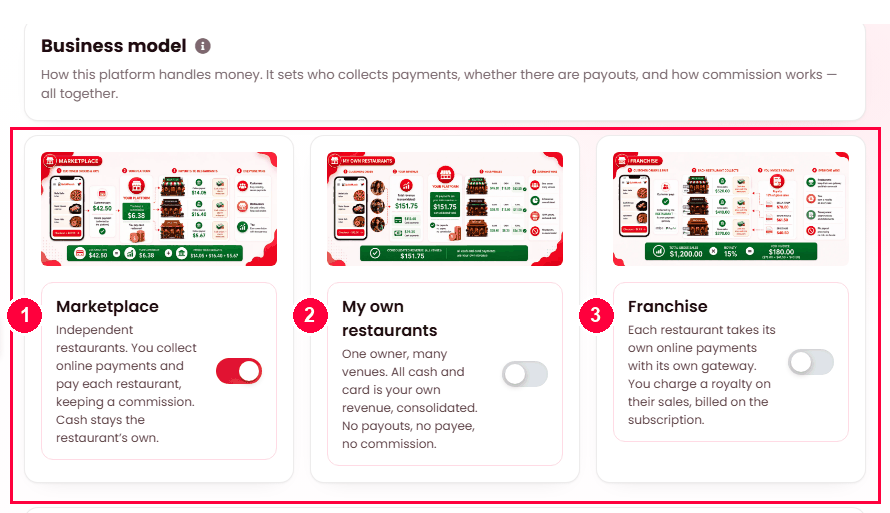
Admin → Settings → Business model — pick one card and save:
- Marketplace — independent restaurants; you take the online payment.
- My own restaurants — every venue is yours.
- Franchise — each restaurant takes its own payments; you bill a royalty.
What each model removes
This is the practical difference. A screen absent in your model is absent for everyone — you will not find it hidden in a menu.
| Screen | Marketplace | My own restaurants | Franchise |
|---|---|---|---|
| Plans & subscriptions | Yes | No | Yes |
| Sponsored ads | Yes | No | Yes |
| Partner recruitment & applications | Yes | No | Yes |
| Payouts to restaurants | Yes | No | No |
| Royalty invoices | No | No | Yes |
The logic behind that table is simple. My own restaurants has nobody to sell a plan to, no third party to advertise to you, and nobody to pay — every venue is already yours. Franchise has no payouts because the franchisee already holds the money; they owe you, so they get an invoice instead.
Splitting payments (marketplace only)
A marketplace can optionally disburse automatically: you collect the whole order, and each restaurant's share is sent to them on a schedule rather than paid by hand. Switch it on under Settings → Payment.
It is offered in marketplace and nowhere else, and that is deliberate:
- My own restaurants has no third party to send money to. Sending it anyway would pay the full order total out of one of your own accounts into another and lose the transfer fee on every order.
- Franchise franchisees are paid by the customer directly, on their own gateway. There is nothing for you to disburse.
Each restaurant is paid on the payout method recorded against it, so collecting through one provider does not stop you paying a restaurant that uses another.
Changing your mind later
The model is a setting and can be changed. What it cannot do is rewrite history: orders already placed keep the commission — or absence of one — that applied when they were taken, and statements already produced stay as they are.
Which one is you?
- You are signing up local restaurants you do not own, taking the payment and keeping a cut — Marketplace.
- You own a chain, or one venue with several branches, and you want ordering, a till and a kitchen screen across all of them — My own restaurants.
- You license your brand to operators who run their own business and pay you a percentage — Franchise.