Navigation
The mega-menu you build yourself — columns of links to anywhere on your site.
Admin → Navigation
The menu is built, not fixed. Without it, a page you create under Pages would have no way of reaching your visitors.
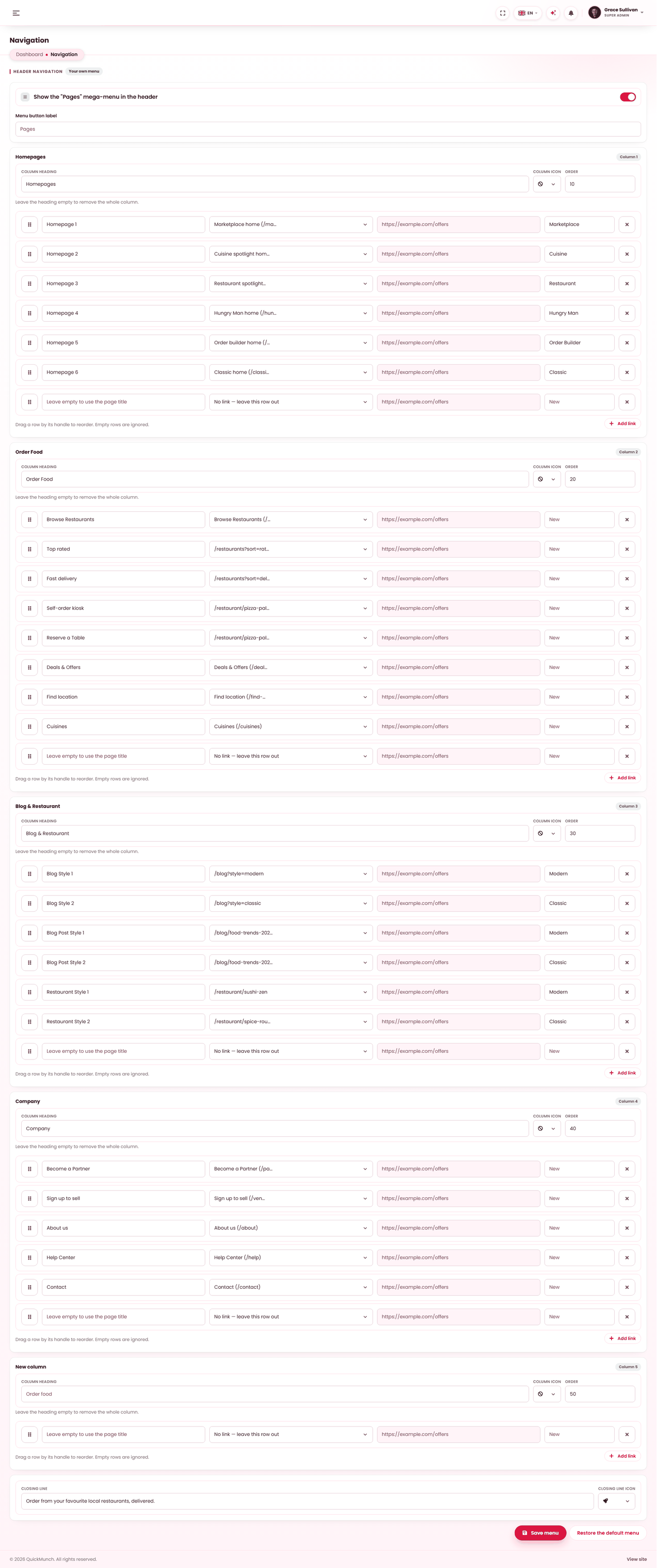
The menu is built, not fixed: columns of links you arrange yourself. Without this, a page you create under Pages would have no way of reaching your own visitors.
Building it
- Up to 6 columns, each with a heading and up to 15 links.
- Each column offers one blank row ready to fill; Add link gives you more.
- Each link carries an icon and points at one of four things.
| Link points at | Chosen from |
|---|---|
| A page | Your published pages. Drafts are not offered — a menu link to a draft is a dead end. |
| A blog post | Your published posts. |
| A built-in destination | The storefront's own addresses — cuisines, find location, the layouts. |
| An address of your own | Anything you type, including somewhere off your site. |
The menu also carries a call-to-action at its foot, with its own wording and icon.
The mega-menu switch and label
Whether the built menu opens as a Pages mega-menu, and what that menu is called, are set here. The label is capped at 30 characters — a header button, not a sentence.
Nothing is saved until you press Save, and
Restore the default menu puts the shipped one back. That makes the screen safe to
explore: build something, look at it, and undo it in one click if it was worse. The restore is
written to the audit log.