Pages
Two different things live on this screen: pages you write from scratch, and the built-in pages whose wording you edit band by band.
Admin → Pages
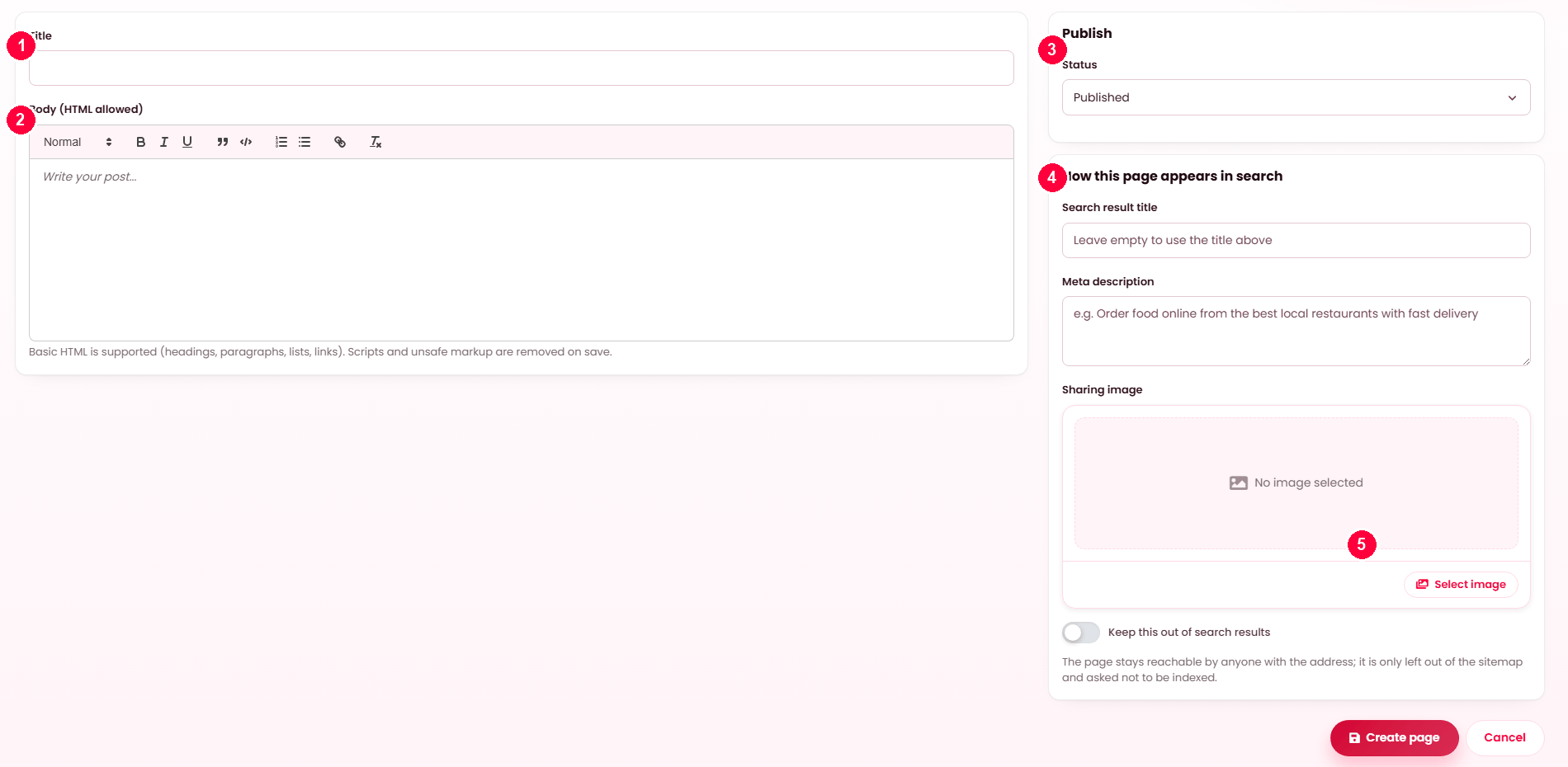
- Title — also the page address unless you change it.
- Body — basic HTML is allowed; scripts are stripped on save.
- Status — Published or Draft.
- How this page appears in search — title, description and sharing image.
- Create page.
Editing works the same way: the pencil on the Pages list opens this form with the page in it.
Your CMS pages. Terms and Privacy are protected and cannot be deleted.
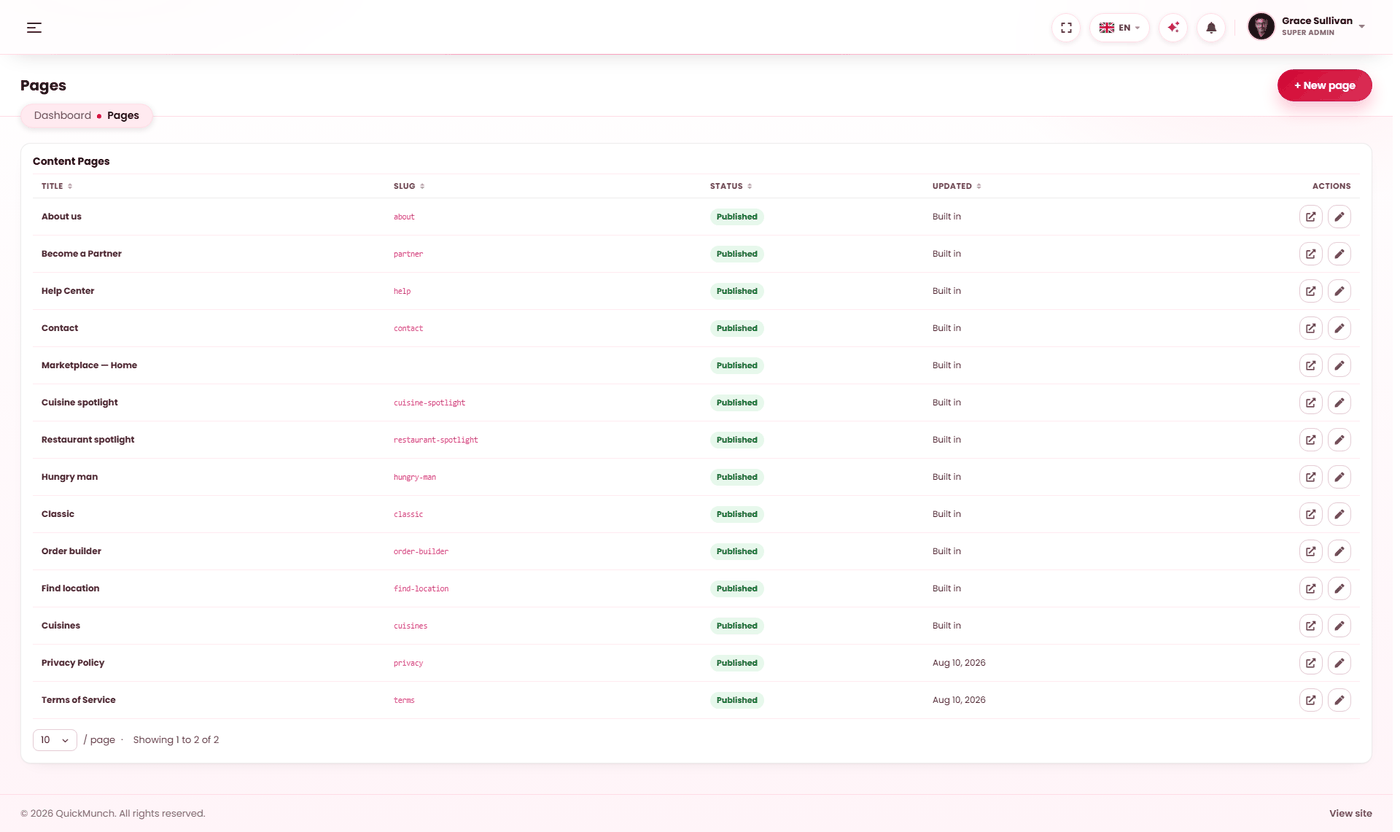
The list holds two kinds of row
| Kind | Status column reads | Editing it means |
|---|---|---|
| Your own pages | Published or Draft | A title and a rich-text body you write yourself. |
| Built in | Built in | A section-by-section editor for a page the product already draws. |
They look alike in the table and behave nothing alike, so it is worth knowing which you have clicked. The Built in label in the Status column is the tell.
Writing your own page
New page opens the editor on its own screen:
| Field | Notes |
|---|---|
| Title | Required. The web address is generated from it on first save and then stays put, so renaming a page never breaks a link to it. |
| Wording | The rich-text body. Pasted markup is cleaned on save, so copying from a word processor cannot inject anything odd. |
| Publish | Published or Draft. A draft is invisible to visitors. |
| How this page appears in search | Search result title, description, sharing image, and Keep this out of search results. Saved by the same submit — see SEO. |
View live appears on published rows and opens the page as a visitor sees it. Saving any page rewrites the sitemap, so a new page is offered to search engines without a second step.
Terms and Privacy cannot be taken down
The footer links to both unconditionally, so a draft or a deletion would turn a footer link into a dead end. Those two rows force themselves published, the editor greys out the Draft option rather than offering a choice the server would overrule, and delete refuses. Rewrite them freely — you simply cannot remove them.
Editing a built-in page
The built-in rows open a different editor: the page is already built, and you are changing its wording and which bands appear, not its layout.
| Page | Address |
|---|---|
| About | /about |
| Partner | /partner — the page restaurants apply through. |
| Help | /help |
| Contact | /contact |
| Services, FAQs | The two supporting pages. |
| Each homepage layout | Its own row. The one currently serving your front page is marked Home — see Homepage layouts. |
| Find location, Cuisines | Browse pages assembled from your own records. |
How the editor is organised
A built-in page is a stack of sections, listed in the order the page draws them — so the editor reads the way the page reads. Each section has:
- A Visible switch. Switch a section off and the page simply does not draw it.
- Its fields — small label, heading, subheading, paragraphs, images, videos, links, icons — whichever that section actually has.
Some sections are marked built from your own data and carry no fields at all: the featured-restaurant band, the deals band, the pricing band. There is nothing to type because the words come from your restaurants, your deals and your plans. The only control such a band needs is whether it draws.
Wording is per language; pictures are not
Text fields are edited one language at a time, so a heading can read differently in English and Spanish. Images, videos, links, icons and switches are shared across every language — you set the picture once and every locale gets it. That is deliberate: a photograph rarely needs translating, and maintaining one per language is work nobody does.
Restore original wording
At the foot of the editor, Restore original wording puts the whole page back to what it shipped with, in every language at once. It asks first. Use it when edits have wandered and you want a clean base rather than a page you are reconstructing from memory.
The pages worth writing first
| Page | Why |
|---|---|
| Privacy policy | Required by Stripe and PayPal when you apply, and linked from your cookie banner. |
| Terms | The same providers ask for it, and it is what you point at in a dispute. |
| About | Built in — edit it. Customers ordering from a new platform check whether it is real. |
| Help | Also built in. Answers the questions that otherwise arrive by email, one at a time. |
When it doesn't work
A page is not visible
It is still a draft, or nothing links to it. Both are common; check the Status column first, then the footer and navigation.
I cannot delete a page
It is Terms, Privacy, or a built-in row. The first two are refused because the footer links to them; built-in pages are part of the product and are edited rather than removed.
A section will not switch off
Heroes on the homepage layouts carry a switch like anything else, but switching one off starts the page halfway down. That is allowed and occasionally wanted — check it on the storefront before leaving it.
I changed a heading and only one language changed
That is correct: text is per language. Switch language in the editor and set the others, or use Restore original wording and start again.