SEO
What search engines and social networks are told about your platform — set once for the site, and overridden per page.
Admin → Settings → Search & sharing
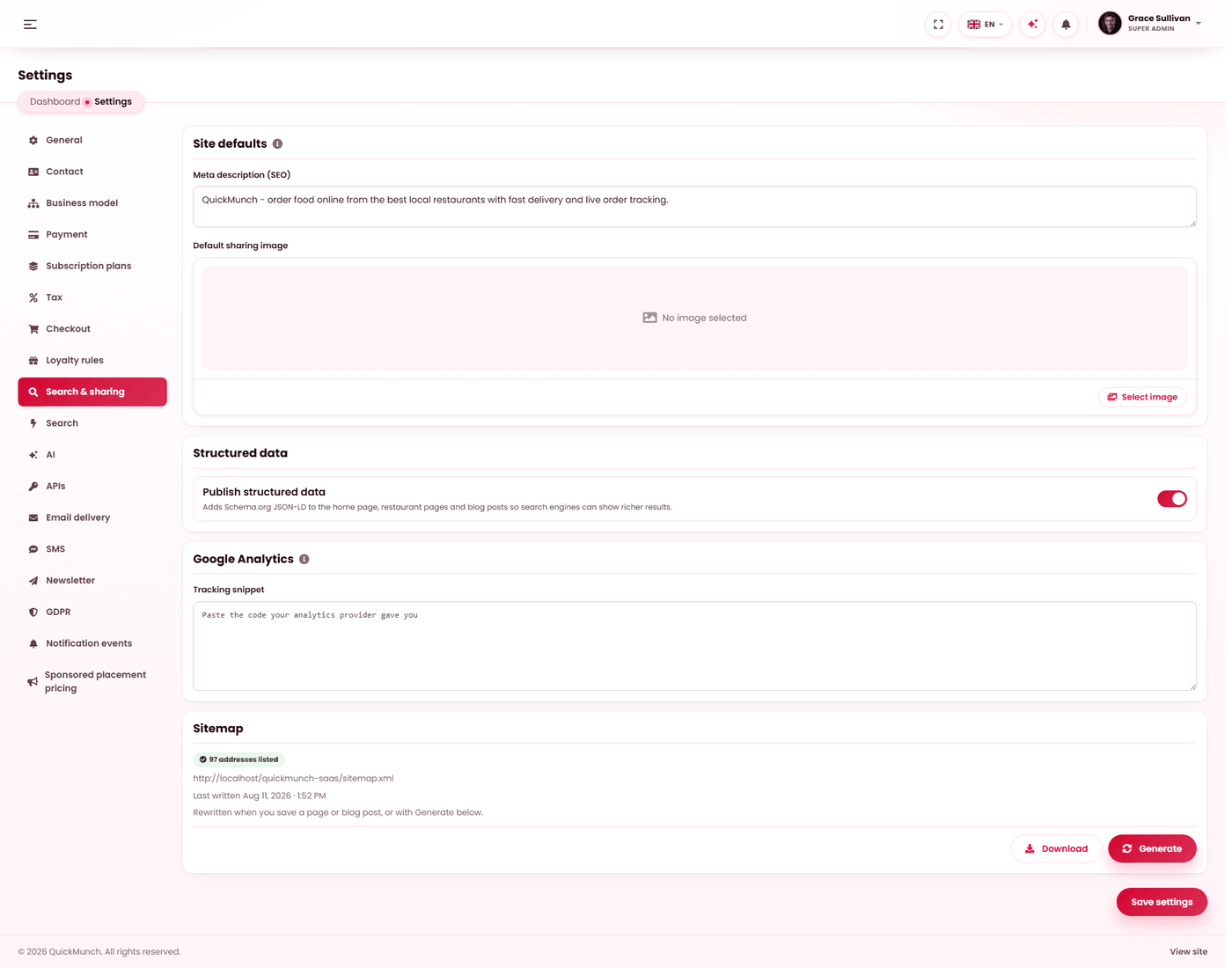
Site meta, the generated sitemap, structured data and analytics.
Two levels
| Level | Where | Covers |
|---|---|---|
| Site defaults | Settings → Search & sharing | Every page that does not say otherwise. |
| Per page | The page's or post's own editor | Just that one, overriding the default. |
Set the defaults once and override only where it earns its keep. A platform with a good default and six deliberate overrides beats one with ninety hand-written descriptions that nobody maintains.
Site defaults
| Setting | What it does |
|---|---|
| Meta description | The sentence under your name in search results, for pages with nothing more specific. Write it for a person, not for a crawler. |
| Default sharing image | The picture shown when any page is posted to a chat or a social network. Without one, links to your platform share as bare text. |
Structured data
Publish structured data — on by default — describes your platform, your restaurants and your posts in the machine-readable form search engines read. It is what makes a restaurant eligible for the richer result with a rating and an address rather than a plain blue link. There is no reason to switch it off unless you are publishing the same descriptions by another route and want to avoid duplicating them.
Google Analytics
Paste the snippet your analytics provider gave you and it is served on every storefront page. It is a plain paste-box on purpose — it takes whatever your provider hands you, not just Google's.
Sitemap
The sitemap is the list of addresses you offer search engines. The panel shows how many are in it and when it was last written. Nothing is written until you click Generate here — not by the installer, not by importing demo content; once it exists, saving a page or publishing a post refreshes it.
It rewrites itself whenever you save a page or a blog post, so in normal use there is nothing to do. Generate forces a rewrite — useful after bulk changes, such as approving several restaurants at once. Download opens the file as a search engine sees it.
Overriding one page
Every page and blog post carries a How this page appears in search section in its own editor, saved with the rest of the page:
| Field | Notes |
|---|---|
| Search result title | Leave empty to use the page's own title. Set it when the title that reads well on the page is too long or too vague as a result. |
| Search result description | Overrides the site default for this page. |
| Sharing image | Overrides the default sharing image for this page. |
| Keep this out of search results | Asks search engines not to list the page. Use it for a thank-you page or an internal note — not as a way of hiding something, which is what Draft is for. |
The built-in pages have the same section, so About, Partner, Help and Contact can each be described properly — see Pages.
robots.txt
The platform answers /robots.txt itself. If you need your own rules, put a real
robots.txt file in the site folder and it is served instead.
When it doesn't work
The sitemap says "not written yet"
Nothing has triggered a write. Save any page, or press Generate. If it stays that way, the folder is not writable.
Links share with no picture
No default sharing image is set, or that page's own override points at a file that was deleted from the media library.
A page I changed still shows the old description
Search engines cache results and re-crawl on their own schedule. Confirm the new wording is in the page itself, then wait — this is the one part of the process you do not control.
My restaurants are not getting rich results
Check Publish structured data is on at Admin → Settings → Search & sharing, then check those restaurants are approved with a complete address and opening hours at Admin → Restaurants. Incomplete records are described as incompletely as they are recorded.