PIN lock
How a shared screen stays shared without becoming anonymous.
Restaurant → Settings → Reservations & booking → Staff screen lock
The problem it solves
A till or a kitchen screen in a busy restaurant is signed in all day. Nobody signs out between customers, and a screen that asked for a password every few minutes would be turned off within a week.
So the screen locks itself when idle and reopens on a 4-digit PIN. Fast enough to be used, and enough to stop somebody wandering behind the counter and refunding an order.
Setting it
Staff screen lock is a number of idle seconds, in Settings → Reservations & booking. 0 means never.
| Setting | Suits |
|---|---|
| 60–120 seconds | A till in reach of customers. |
| 300+ seconds | A kitchen screen nobody but staff can touch. |
| 0 (never) | A screen in a locked office. Rarely the right answer anywhere else. |
The lock can also be engaged deliberately from the dashboard menu — worth doing when stepping away rather than waiting for the timer.
Unlocking
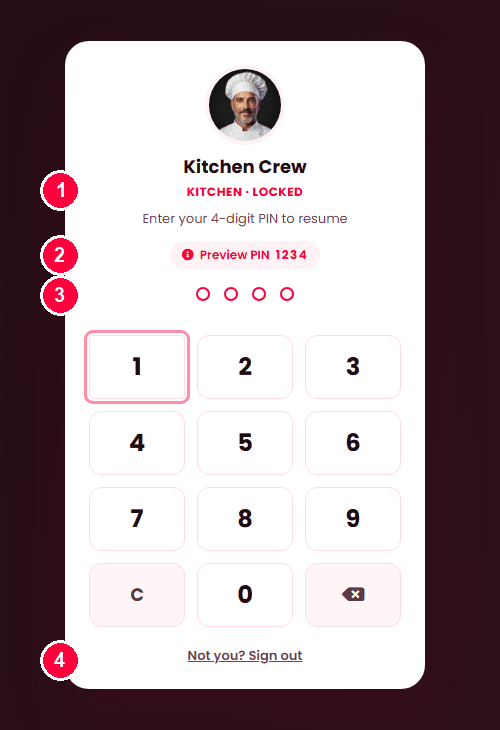
The lock screen shows who is signed in and their department, with a keypad for the PIN. There is also Not you? Sign out, which is how the screen changes hands at the end of a shift.
PINs are set on Staff, and every staff member has one.
- Who is locked, and their role — so the next person knows whose shift is open.
- On a demo install the PIN is shown here. It is not shown on a real one.
- Four dots fill as the PIN is typed on the keypad.
- Not you? Sign out ends the shift and returns to the sign-in screen.
The lock covers the screen entirely — the dashboard behind it cannot be read or used.
It is what makes the reports honest
Every action is recorded against whoever is signed in. Without a lock, one login covers a whole shift and staff reports record that "the manager" did everything. With it, the screen changes hands properly and the record follows.
The same PIN authorises a void or a large discount at the till — so approving something is attributable to a person rather than to whoever the screen happened to be logged in as.
When it doesn't work
The screen never locks
The setting is 0, or the signed-in account has no PIN. Both stop it.
"Too many attempts"
Wait the stated time. A correct PIN then clears the back-off entirely.
Somebody forgot their PIN
Set a new one on Staff. It takes effect at once, and their password is untouched.
It locks too often
Raise the seconds. A till nobody can keep unlocked will end up with the setting at 0, which is worse than a longer timer.