Reservations
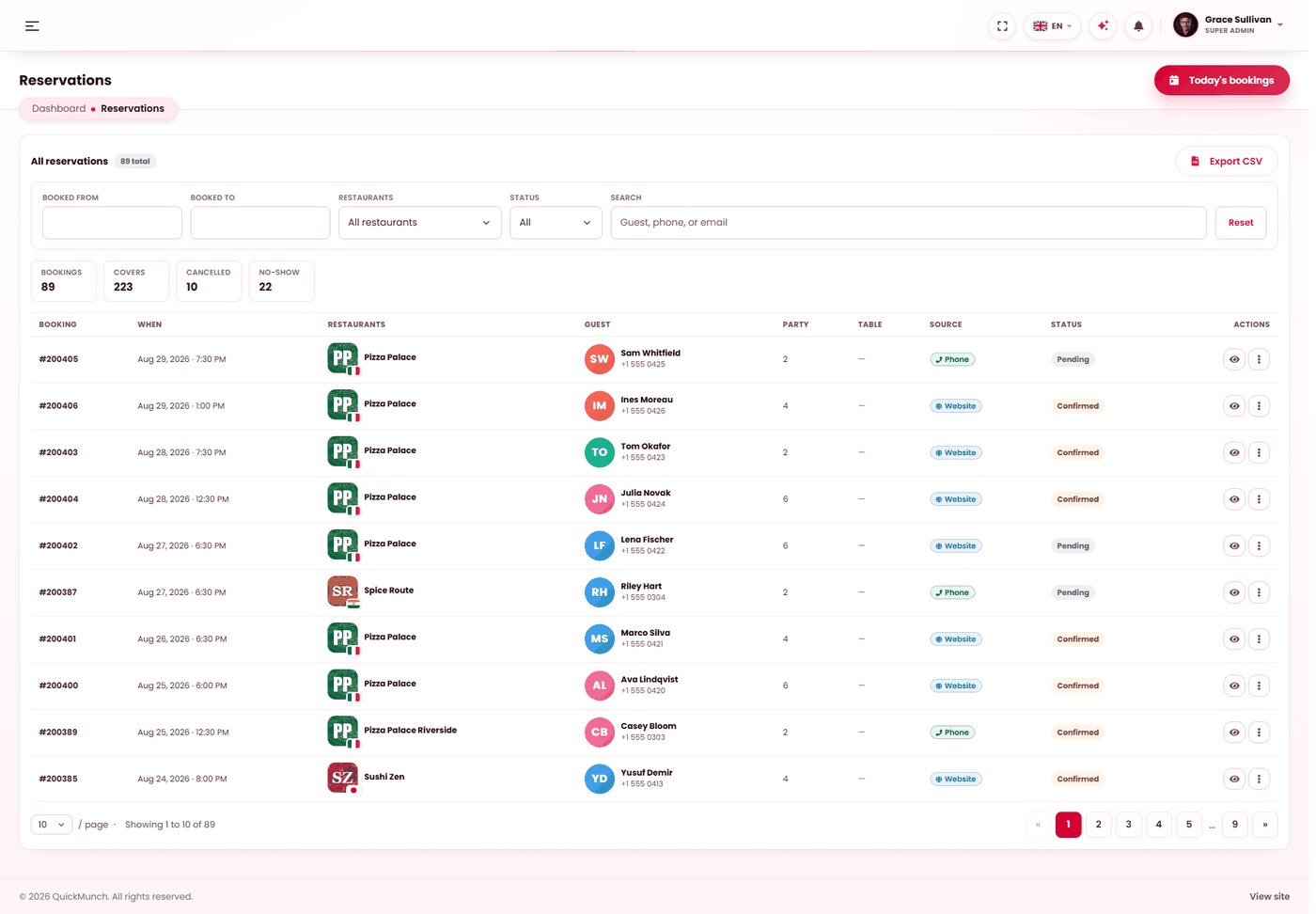
Every table booking across the platform, for when a guest or a restaurant asks you about one.
Admin → Reservations
Bookings across every restaurant, with their status.
What this screen is for
Restaurants run their own bookings on their own screen, with a calendar and the day's floor — see Reservations (restaurant). This screen is oversight: one searchable list across every venue, for answering a question a guest or a restaurant brings you.
So it reads rather than manages. The only change you can make from here is to cancel a booking.
Finding a booking
The filter bar above the list narrows it five ways, and they combine:
| Filter | Use it to |
|---|---|
| Booked from / Booked to | Set the service dates. This is the filter that matters most — see the note below. |
| Restaurant | Narrow to one venue. Only restaurants that accept reservations are listed. |
| Status | Narrow to one of the seven states below. |
| Search | Find by guest name, phone or email — the three things a caller can give you. |
| Today | One click; sets both dates to today. The usual starting point. |
The totals strip
Above the list, four figures describe whatever the filters currently match:
| Figure | Meaning |
|---|---|
| Bookings | How many rows match. |
| Covers | Seats those bookings account for, excluding cancellations and no-shows. Ten bookings can mean twenty guests or eighty; this is the number a floor is planned against. |
| Cancelled | How many were called off. |
| No-show | How many were confirmed and never arrived. |
The seven states
Status moves forward only — a completed or cancelled booking is final.
| Status | Meaning | Can become |
|---|---|---|
| Pending | Requested, not yet answered by the restaurant. | Confirmed, Waitlisted, Cancelled |
| Waitlisted | No table at that time. Held in case one frees up. | Confirmed, Cancelled |
| Confirmed | Accepted. The guest has their confirmation. | Seated, No-show, Cancelled |
| Seated | The party arrived and is at a table. | Completed, No-show, Cancelled |
| Completed | They came, they ate, the booking is closed. | — |
| Cancelled | Called off by either side. | — |
| No-show | Confirmed and never arrived. | — |
Waitlisted is not rejected. The guest is still waiting on an answer, so a waitlist nobody works through is worse than refusing the booking outright — the guest believes they may still have a table.
Opening one booking
The booking reference opens its detail page, which is the whole story in one place: guest and contact details, party size, table, sitting length, deposit if one was taken, the linked customer account, the guest's special requests, the restaurant's internal staff note, and a history table of every status change with who made it and when. Changes made automatically are attributed to the system, so an automatic no-show is never mistaken for somebody's decision.
Cancel booking is available from the list and from the detail page. It asks first.
Exporting
Export CSV exports what the filters currently match, not the whole table — so narrow first, then export. That is what makes a per-restaurant or per-month extract a two-step job.
When it doesn't work
Reservations is not in my menu
The Reservations service is switched off. See Turning features on and off.
A restaurant is missing from the filter
Only venues that accept reservations are listed. That restaurant has it off at Restaurant → Settings → Reservations & booking — you can turn it on for them by opening the restaurant at Admin → Restaurants and editing the same panel.
The list is empty and I expected rows
Almost always the date range. It filters on the service date, not the date the booking was taken — a booking made today for next month falls outside a "today" window.
A guest says they never got a confirmation
Check the booking exists here first, then the email. Mail is queued and delivered by a scheduled job — if Email retry is not running, nothing leaves. See Scheduled tasks.