GDPR & privacy
The cookie-consent banner, what belongs in it, and the pages it has to point at.
Admin → Settings → GDPR
- Show a cookie-consent banner — on or off.
- Banner message — plain language, not boilerplate.
- Accept button label.
- Privacy policy link — optional, and worth setting.
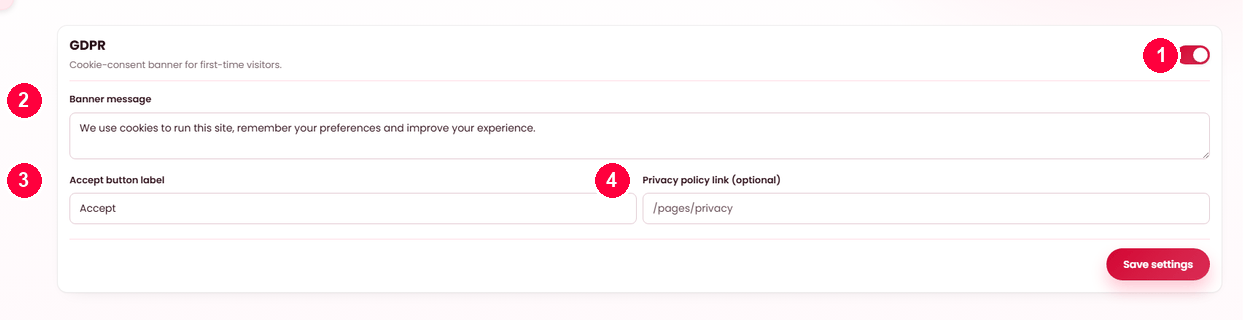
The banner
A consent notice shown to first-time visitors. Once accepted it does not reappear, so it is not a permanent tax on your storefront.
Point it at a real policy
The link should go to your own privacy page, written for your platform. A banner that consents to nothing in particular, linking to nothing, is worse than none: it looks like compliance without being it.
Write the page under Pages. Terms and Privacy are protected there — the product refuses to unpublish or delete either, precisely because things like this banner and your payment providers depend on them existing.
What actually collects data on your storefront
Worth knowing before you write the message, because these are what a notice is about:
| Source | Where it comes from |
|---|---|
| Your analytics snippet | Anything you pasted under SEO. This is usually the one that needs consent. |
| Session cookies | The platform's own — signing in, the basket, the chosen language. |
| Payment providers | Stripe and PayPal, on their own pages during checkout. |
| Maps | Where a map provider is configured — see Maps. |
Nothing else phones out. Every bundled library is served from your own server — see Credits & licences.
Requests about personal data
Where somebody asks what you hold or asks for it to be removed, the records are yours and the screens are here: Users for the account and its history, Orders for what they bought, Reviews for what they wrote, and Subscribers for a newsletter address.
Accounts are archived rather than hard-deleted, because orders and audit entries reference them — see Users. What you are obliged to do with that is, again, a local question.
When it doesn't work
The banner does not appear
It shows to first-time visitors only. Try a private window; a browser that has already accepted will not show it again.
The policy link goes nowhere
The page is a draft, or the address is wrong. Check it under Pages.
The banner appears every visit
The visitor is blocking cookies entirely, so the acceptance cannot be remembered. Nothing to fix at your end.