Subscribers
Everyone who signed up through a newsletter form. Every address is saved in your own database, whether or not you use Mailchimp.
Admin → Subscribers
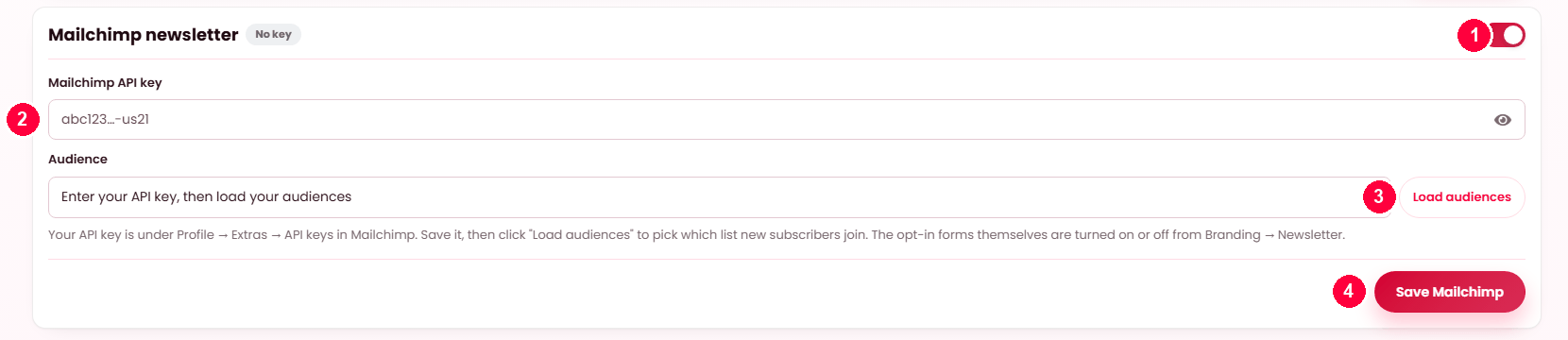
Connecting Mailchimp
- Turn Mailchimp newsletter on.
- Paste your Mailchimp API key — in Mailchimp it is under Profile → Extras → API keys.
- Load audiences, then pick the list new subscribers join.
- Save Mailchimp.
Leave it off and sign-ups are simply stored here instead.
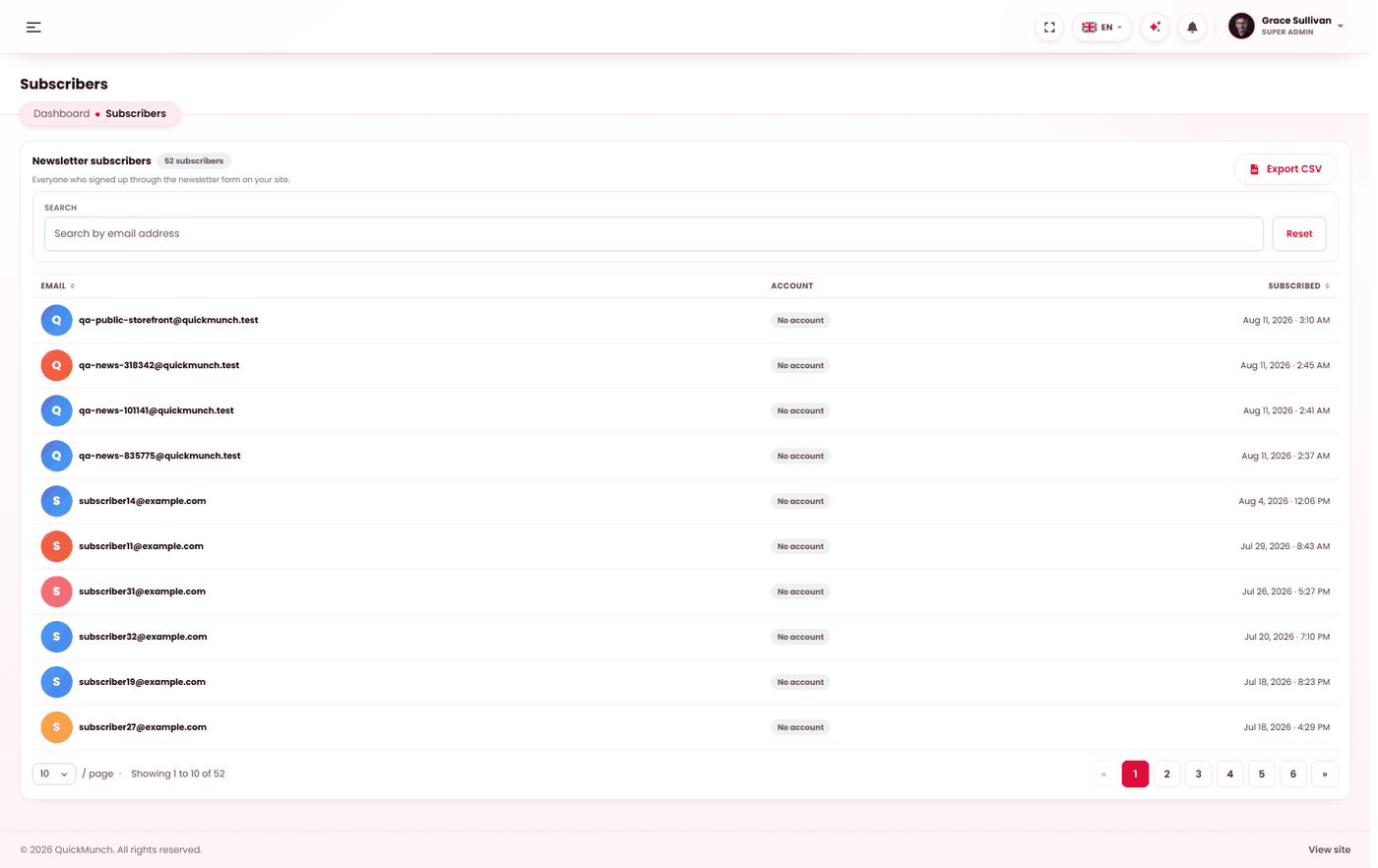
Everyone who signed up, with their source and date.
Your database is always the record
This is the fact worth having straight, because it decides what you can rely on.
When somebody subscribes, their address is always written to your own database first. That happens on every subscription, on every form, whatever your Mailchimp settings say. This screen lists what is in that table.
Mailchimp is not an alternative to that — it is an extra step that happens afterwards, for the forms you point at it. The address is in both places, not one or the other.
| You have | What happens when somebody subscribes |
|---|---|
| No Mailchimp | The address is saved in your database and appears here. That is the whole flow. |
| Mailchimp connected | The address is saved in your database and sent to your Mailchimp audience. |
The two forms and their three settings
Settings → Newsletter holds two sign-up forms — Homepage newsletter and Blog sidebar — set independently. The setting controls whether the form is shown, and whether that form's addresses are also pushed to Mailchimp:
| Setting | Form shown? | Saved to your database | Also sent to Mailchimp |
|---|---|---|---|
| Local list | Yes | Yes | No |
| Mailchimp | Yes | Yes | Yes — if Mailchimp is connected |
| Hidden | No | — | — |
So Local list does not mean "instead of Mailchimp" — it means "do not forward this form's addresses". Both settings save locally. They can differ per form: a homepage form feeding Mailchimp and a blog form kept local is a perfectly ordinary arrangement.
The list
| Column | Shows |
|---|---|
| The address. | |
| Account | Has an account if they also registered — you can see their orders. No account if they only gave an address. |
| Subscribed | When they signed up. |
Search by address. Export writes whatever the search currently matches, and the export is written to the audit log with its row count — an export of customer addresses is worth having a record of.
Two behaviours that look like bugs and are not
| Behaviour | Why |
|---|---|
| Subscribing twice reports success | Duplicates are ignored quietly. Telling a visitor "you are already on the list" achieves nothing except confusing somebody who forgot. |
| Rapid repeat submissions are refused for a while | The form is rate-limited per visitor. It protects your database and, where Mailchimp is connected, your API quota. |
Connecting Mailchimp
- Paste your Mailchimp API key.
- Press Load audiences — yours are fetched, so you pick from a list rather than copying an identifier by hand.
- Choose the audience, switch Sync new subscribers on, and save.
All three are required. A key saved with no audience chosen, or with the switch off, is a configuration that saves successfully and syncs nothing.
Sending to the list
There is deliberately no "send to all subscribers" button here. Bulk email is a specialist job — deliverability, unsubscribe handling, bounce processing — and pushing a few thousand messages through your own mail server is how a domain gets blocked.
So the platform collects and stores; sending is done by a tool built for it, reached either by the Mailchimp sync or by exporting the CSV into whatever you already use.
When it doesn't work
Nobody is subscribing
A form is set to Hidden at Admin → Settings → Newsletter. Check both — it is possible to have the blog form live and the homepage form off.
Addresses are here but not in Mailchimp
Expected if that form is set to Local list. If it is set to Mailchimp, check all three parts of the connection: the switch on, a valid key, an audience chosen.
Load audiences returns nothing
The API key is wrong or lacks permission. Mailchimp keys end in a datacentre suffix such as
-us21 — paste the whole thing, suffix included.
Mailchimp went down for a day — did I lose those people?
No. They are in your database and on this screen. Export the affected period and import it.
Somebody wants to be removed
Removing them here does not remove them from Mailchimp, and unsubscribing in Mailchimp does not remove them here. Two lists means two removals — see GDPR & privacy.