Users
Every account on the platform — creating them, suspending them, archiving them, and the protections that stop you locking yourself out.
Admin → Users
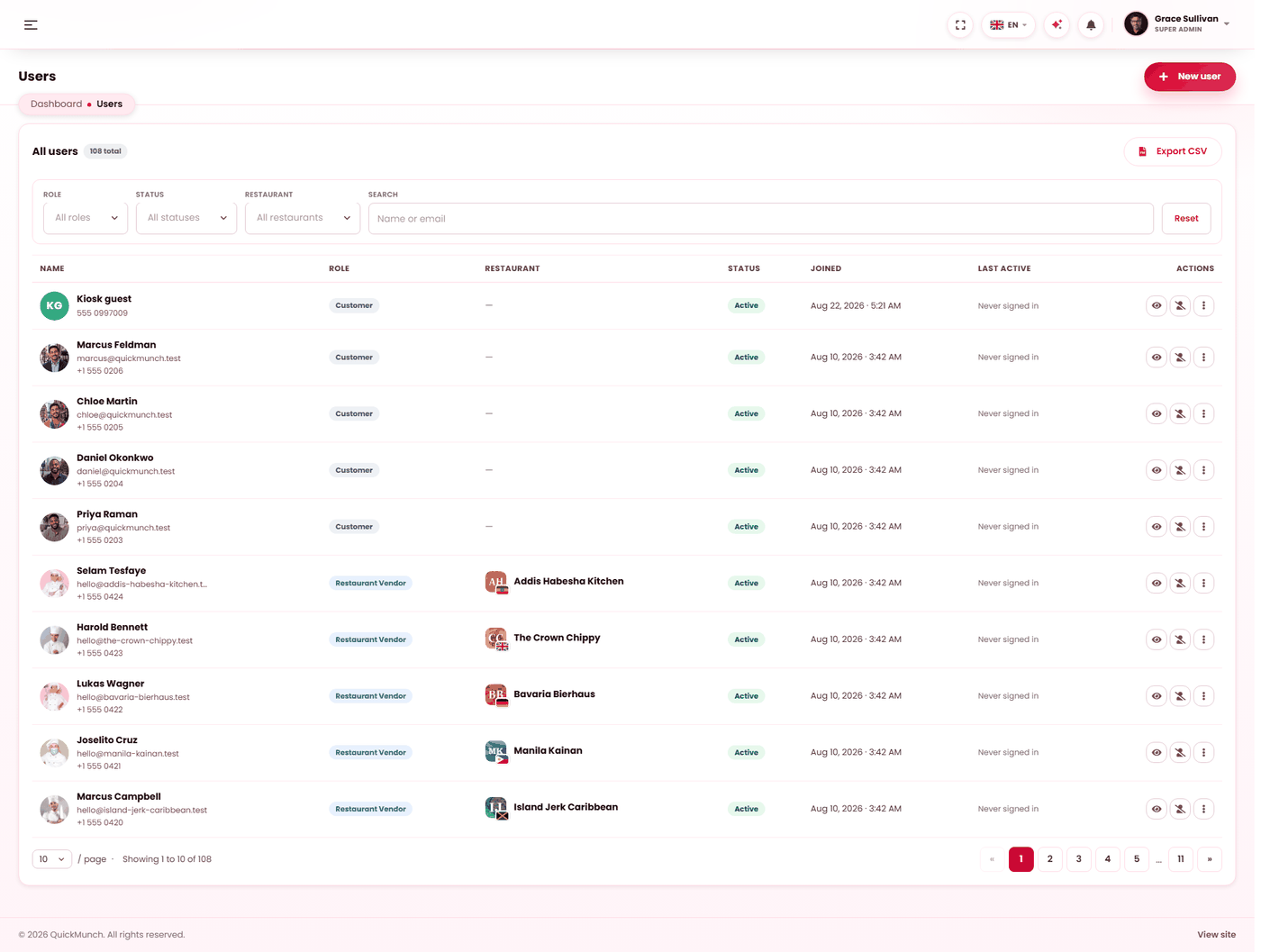
Everyone with an account, their role and status.
Who is in here
Every account, whatever it is for. A user is a person with a login; what they may do comes from their role.
| Kind | Created by |
|---|---|
| Your own team | You, here. |
| Restaurant owners | Signing up, or by you when you add a restaurant. |
| Restaurant staff | Their own restaurant owner — see Staff. |
| Customers | Ordering or registering on the storefront. |
| Drivers | You or a restaurant, depending on who employs them. |
Finding somebody
Four filters, and they combine:
| Filter | Narrows to |
|---|---|
| Role | One role. |
| Status | Active, suspended or archived. |
| Restaurant | Accounts attached to one venue. |
| Search | Name or email. |
Export CSV writes whatever the filters currently match, not the whole table.
Adding somebody
| Field | Rules |
|---|---|
| First and last name | Required. |
| Required and unique across the platform. Password resets go here. | |
| Role | Required, and must be a real role. |
| Restaurant | Required for staff and driver accounts. They belong to a venue; an unattached one has nowhere to work. |
| Phone | Optional. |
| Password | At least 12 characters. On an edit, leave it blank to keep the current one. |
| Active | Whether they can sign in. |
Prefer an existing role over inventing one for a single person.
Suspend, archive, restore
| Action | Effect | Reversible |
|---|---|---|
| Suspend | Blocked from signing in. Everything they created stays. For a restaurant owner, every live billing agreement on the restaurants they own is cancelled at the gateway, so nothing is charged again; their paid terms run to their end dates. | Yes — Activate. Billing is not revived: they renew from their Plans & billing screen. |
| Archive | Removed from the working list, history intact. | Yes — Restore. |
There is no hard delete, and that is deliberate: orders, reviews and audit entries reference the person who made them, and destroying the account would leave your records unable to explain themselves.
The protections
Several actions are refused outright, each for a reason worth knowing:
| Refused | Why |
|---|---|
| Removing the last active super admin | Nobody could administer the platform afterwards. |
| Archiving your own account | You would sign yourself out of the thing you are using. |
| Changing your own status | Same reason. |
| Suspending a super admin | Super admin accounts are protected from this screen. |
| Archiving a restaurant owner who still owns a restaurant | The venue would be ownerless. Reassign or remove the restaurant first. |
| Signing yourself out everywhere | It would end the session you are working in. Do it from your own account page instead. |
Two actions on somebody else's account
- Sign out everywhere — ends every session that account has open. The right response to a shared or leaked password: change it, then do this.
- Reset PIN — clears a staff member's counter PIN. Only applies to staff accounts; anything else is refused rather than silently doing nothing. See PIN lock.
Opening one account
The detail page is the whole picture, and what it shows depends on what the person is:
| Section | Holds |
|---|---|
| Account | Member since, last updated, whether an access PIN is set, and the linked restaurant. |
| Figures | Customers: orders, total spent, reviews. Owners: orders and revenue collected. Drivers: assigned and delivered. |
| Recent | Their recent orders, reviews or deliveries. |
| What this account has done | Their recorded actions, with IP address. |
| Account history | What has been changed on the account, and by whom. |
Those last two answer different questions — what they did, and what was done to them. In a dispute you usually want the second.
When it doesn't work
"That email address is already in use"
Often the person's own customer account. Use another address, or find and edit the existing one.
"Staff and driver accounts must be assigned to a restaurant"
Choose the venue. Those roles only mean something inside one.
A new user never received their email
Mail is queued and sent by a scheduled job. If Email retry is not running, nothing leaves — see Scheduled tasks.
Somebody cannot see a screen they should
Two gates: the service switch decides whether the screen exists, their role decides whether they may open it. Check the switch first — see Turning features on and off.
I cannot archive an owner
They still own a restaurant. Reassign or remove it first.