What each role can do
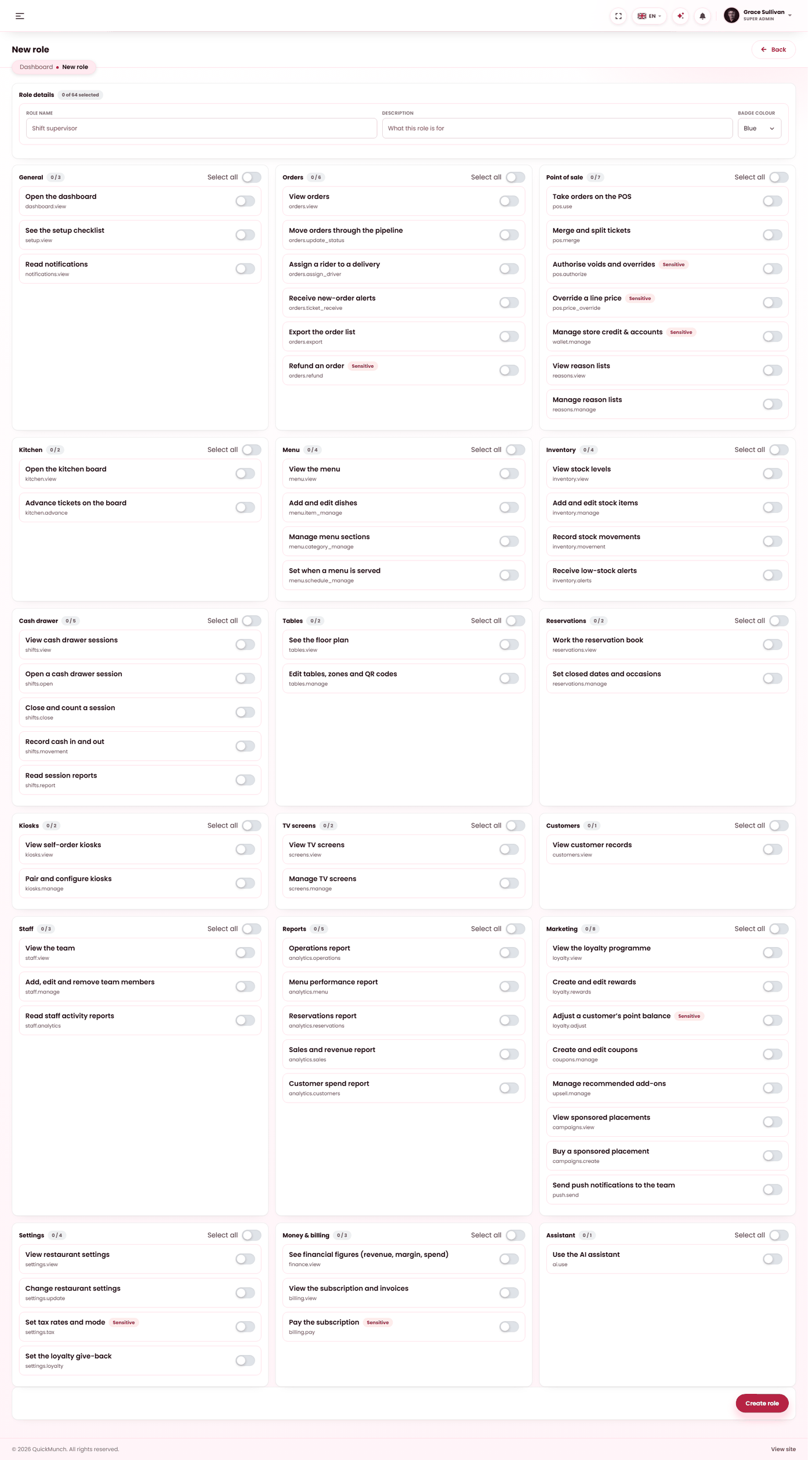
The privilege catalogue behind the five roles — eighteen modules, and the three gates a screen has to pass.
Restaurant → Staff
Compose a role by ticking privileges. What is unticked is not reachable.
Three gates, in this order
Whether somebody can open a screen is decided three times over, and knowing which gate closed is most of troubleshooting:
| Gate | Decides | Changed by |
|---|---|---|
| The service switch | Whether the feature exists on this platform at all. | Your platform operator — see Turning features on and off. |
| Your plan | Whether your restaurant has it. | Your plan — see Your plan & billing. |
| Their role | Whether that person may use it. | You, on Staff. |
Check them in that order. A privilege cannot reveal a feature that does not exist, so changing somebody's role when the switch is off achieves nothing.
The eighteen modules
Privileges are grouped by what they govern:
| Module | Covers |
|---|---|
| General | Dashboard, the setup checklist, notifications. |
| Orders | View, change status, assign a driver, receive tickets, export, refund. |
| Point of sale | Use the till, merge tables, authorise, override a price, manage reasons. |
| Kitchen | The kitchen display. |
| Menu | Dishes, categories, imports. |
| Inventory | Stock items and movements. |
| Cash drawer | Opening and closing a drawer session. |
| Tables | The floor plan. |
| Reservations | Bookings. |
| Kiosks | Self-order devices. |
| TV screens | Menu boards. |
| Customers | Your customer list. |
| Staff | The team itself. |
| Reports | Analytics. |
| Marketing | Coupons, loyalty, campaigns. |
| Settings | The restaurant's own settings. |
| Money & billing | Payouts, your plan, invoices. |
| Assistant | The AI assistant. |
The privileges worth understanding individually
| Privilege | Why it is separate |
|---|---|
| Refund an order | Moves money out. Separate from working orders, so a server can fix a status without being able to return a payment. |
| Export orders | Takes customer data out of the product. Separate from viewing it on screen. |
| Authorise (till) | Approves somebody else's void or large discount. This is what makes a manager a manager at the counter. |
| Override a price | Changes what a dish costs on one ticket. |
| Open / close the drawer | Two separate privileges. Closing is the one that declares a count and produces a variance. |
What the roles amount to in practice
| Role | Broadly |
|---|---|
| Manager | Everything operational, plus authorising at the till. Not your money screens. |
| Waiter / cashier | Till, orders, tables. Not reports, settings or money. |
| Kitchen staff | The kitchen board, and enough of the menu to mark something unavailable. |
| Host | Reservations and the floor plan. |
| Driver | Their own deliveries only. |
The owner is not a role — the owner is you, and sees everything.
When it doesn't work
I changed their role and nothing changed
Have them sign out and back in. If it is still hidden, the feature is off platform-wide — your operator checks Admin → Settings → Services. That is the first gate, and the one people skip.
A manager cannot see my earnings
Correct and deliberate. Money screens are the owner's.
Somebody can do something I did not expect
It is included in their role. Move them to a narrower one — the five are fixed, so the answer is the role rather than the privilege.
A whole module is missing for everybody
Not a permissions question. Either the feature is off platform-wide — your operator checks Admin → Settings → Services — or your plan does not include it, which you can see at Restaurant → Plans.