Tools
Quick Social and Social proof for every restaurant: the switch, the channels you offer (Tripadvisor among them), the network apps you provide, and the limits per branch.
Admin → Settings → Tools
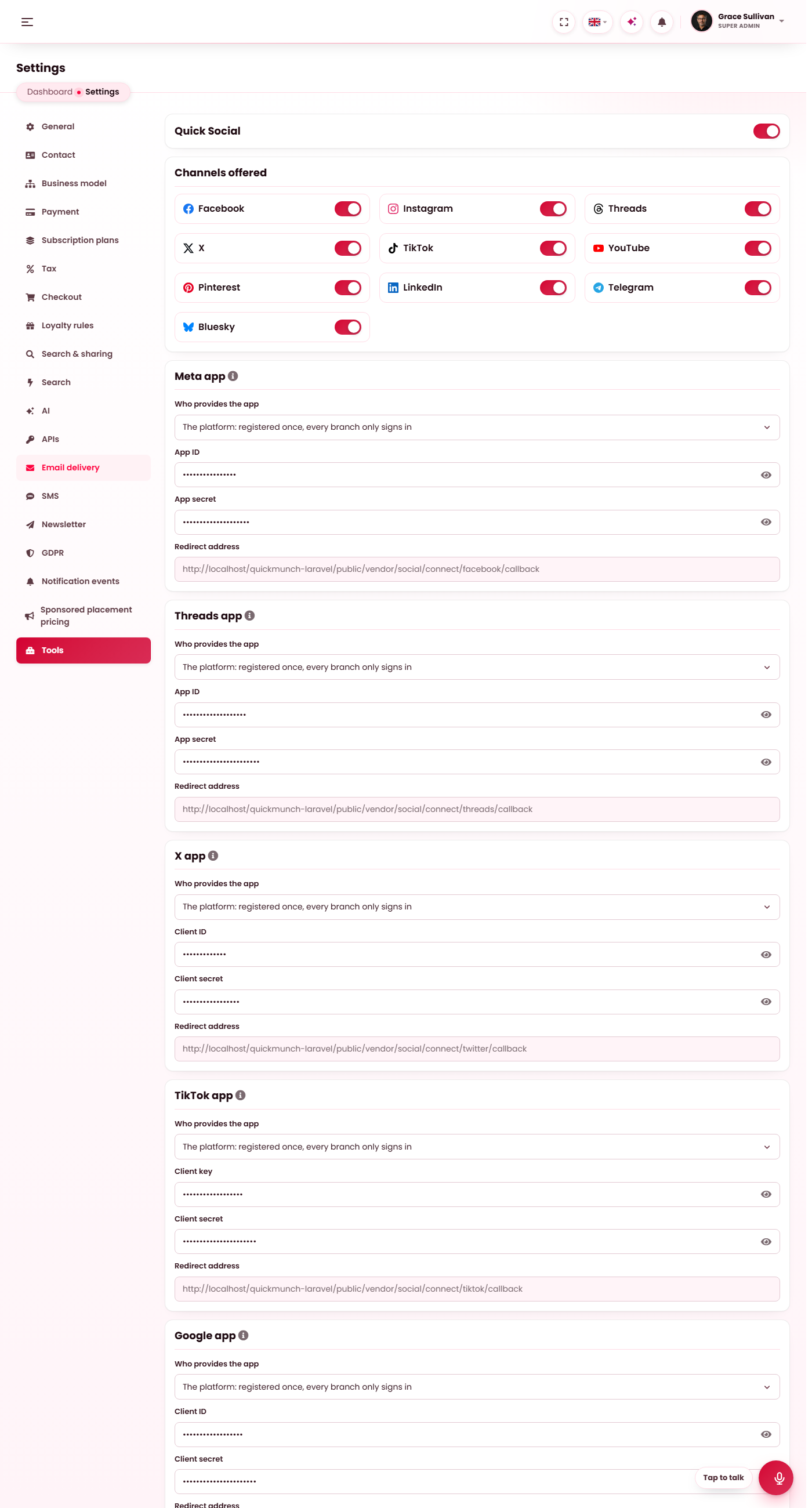
The Tools tab: the Quick Social switch, the channels offered, one card per network app, and the limits per branch.
The switch
Tools are optional parts of the product that restaurants use. Quick Social and Social proof ships on, and its one switch covers both: Social proof has no switch of its own. Off, the tool is off everywhere: its group leaves every restaurant's sidebar, its addresses answer with the unavailable screen, the What Our Guests Say section leaves the restaurant pages, its three scheduled jobs leave the catalogue and the Social captions AI feature leaves Settings → AI. Nothing is deleted — switching it on again brings every branch's accounts, campaigns and approved guest posts back as they were.
Channels offered
One switch per network: Facebook, Instagram, Threads, X, TikTok, YouTube, Pinterest, LinkedIn, Telegram and Bluesky. A channel switched off leaves every branch's Channels page, composer and Social proof sources; an account a branch had connected is kept, so switching the channel back on brings it back.
The last switch is Tripadvisor, a Social proof source only (nothing is published to it). It ships off, because it needs the platform's key: switched on, its card opens below the network apps. Restaurants see Tripadvisor among their sources only while it is switched on and the key is saved.
Network apps
One card per app a network needs — Meta (Facebook and Instagram), Threads, X, TikTok, Google (YouTube), Pinterest and LinkedIn. Telegram and Bluesky need no app: a branch connects them with a bot token or an app password on its own page.
| Field | What it does |
|---|---|
| Who provides the app | The platform: you register the app once in the network's developer portal, its keys live here, and every branch only signs in. Each branch: a restaurant registers its own app and types the keys on its Channels page. |
| App ID / App secret (Client ID, Client key) | The platform's keys for the app, when the platform provides it. Absent is left alone, empty clears, and a saved secret is never shown on the public preview. |
| Redirect address | The address to register in the developer portal, filled in with this site's domain: /vendor/social/connect/{provider}/callback. It is the same for every branch. It cannot be edited: it follows the address the site is opened on, so a new domain or https gives a new address to register. The copy button at its end copies it. |
Switching who provides an app only changes how new connections are made: a branch that connected through the platform's app keeps using it, and one that connected with its own keeps its own. The portal steps for each network are on Channels.
Tripadvisor
Shown while Tripadvisor is switched on under Channels offered. One key serves every restaurant; each restaurant then picks its own listing on its Social proof page.
| Field | What it does |
|---|---|
| Tripadvisor Content API key | Create it at tripadvisor.com/developers (the first 5,000 calls a month are free) and allow this server's address on it. Absent is left alone, empty clears, and a saved key is never shown on the public preview. |
Limits per branch
What any one branch may do; 0 means no limit. A limit is checked where the thing starts — a connection, a publish, a schedule — never on what is already there, so lowering a limit takes nothing away.
| Limit | Counts |
|---|---|
| Channels a branch may connect | The accounts on the branch's Channels page. |
| Campaigns and videos a branch may send per month | Sends and schedules in the calendar month; drafts are not counted. |
| AI captions a branch may ask for per month | Every Write with AI answer, counted on the audit log. |
What lives elsewhere
- Social captions — the AI feature behind Write with AI, its provider and model: AI providers. It ships off.
- Social posts due, Social channel check and Read social proof — the three jobs, on by default while the tool is on: Scheduled tasks.
- Quick Social privileges — open the tool, publish, connect accounts — cover Social proof too: Staff permissions.
- Google as a Social proof source follows Google Business Profile under Settings → APIs.
- Every branch's accounts, campaigns and guest posts are deleted with the restaurant when it is removed.
When it doesn't work
A restaurant says a network is "not available yet"
The platform provides that app but its keys are empty here. Save the keys, or choose that each branch registers its own app.
Restaurants do not see Tripadvisor
Tripadvisor is switched off under Channels offered, or its key is empty. Switch it on, save the key and press Save settings.
Scheduled posts never go out
The scheduler is not running, or the tool is off. See Scheduled tasks.