Ordering
What your customers go through from basket to confirmation — and every setting of yours that changes it.
Storefront → Checkout
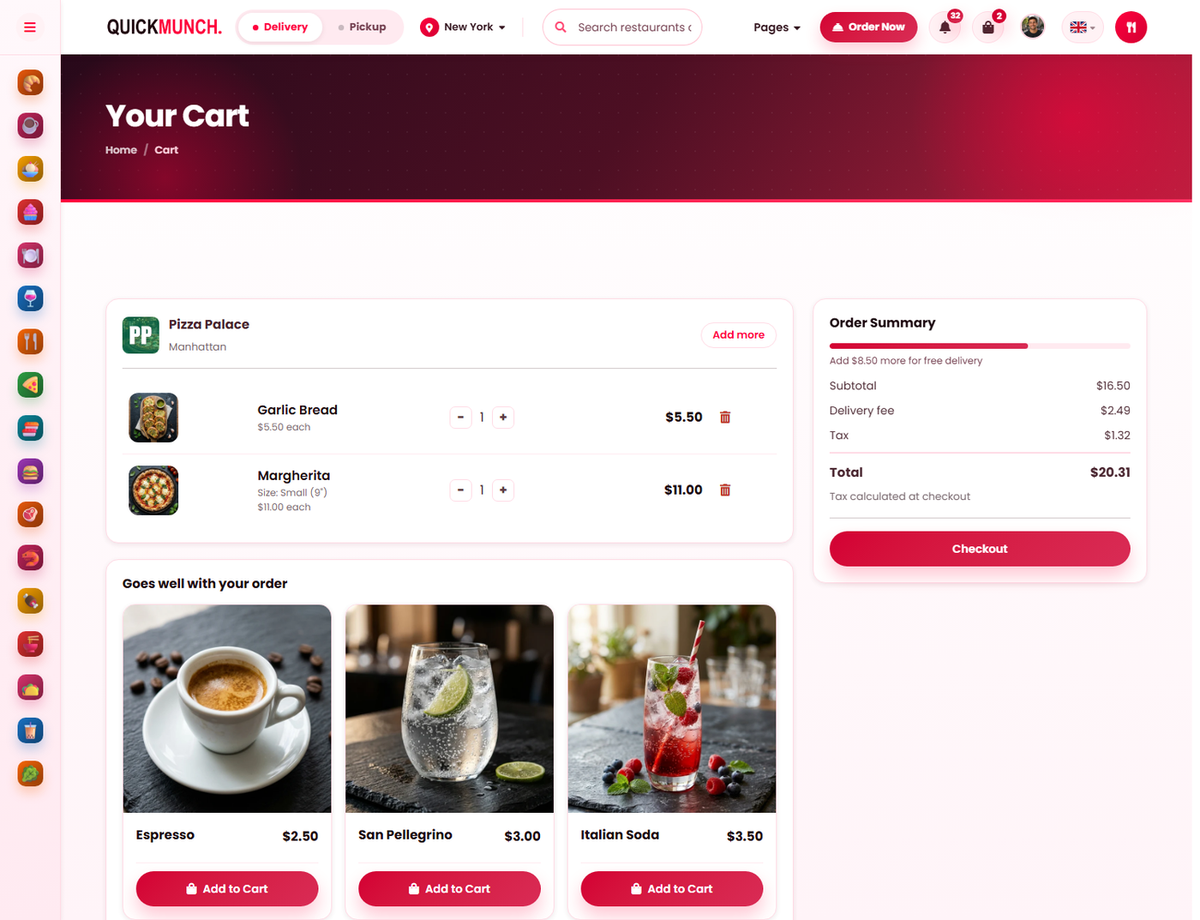
The basket
- Every line with its quantity and price — change or remove it here.
- Order summary shows the subtotal, the delivery fee and how much more earns free delivery.
- Goes well with your order is your upsell pairings, shown at the moment they are most likely to land.
- Checkout.
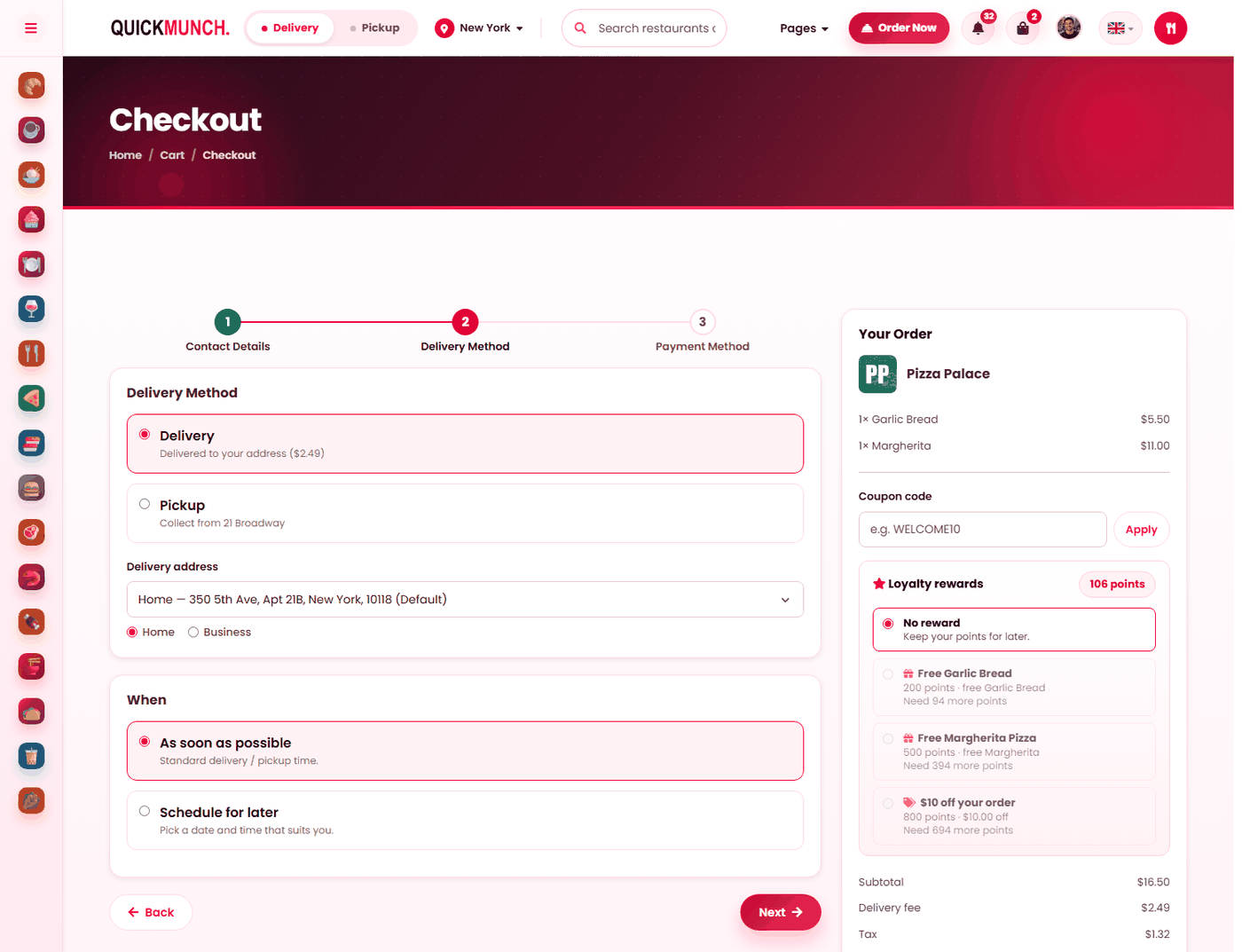
Checkout
- Contact details — who the order is for.
- Delivery method — delivery to a saved address, or pickup.
- When — as soon as possible, or scheduled for later.
- Payment method — card, cash or your offline instructions.
The right column carries the order, a coupon code box and any loyalty reward the customer has points for — each showing what it costs and what it is worth.
Why this page is here
You will be asked "why can't I order?" more often than any other question, and the answer is almost always a setting of yours rather than a fault. This page walks the customer's route and names what governs each step.
Choosing how it arrives
| Mode | The customer sees | Governed by |
|---|---|---|
| Delivery | Delivered to your address, with the fee. | Delivery on/off, radius, zones — Settings → Charges & delivery. |
| Pickup | Collect from the restaurant. | Always available when you trade. |
| Dine in | Brought to their table, no delivery fee. | Reached by scanning a table QR or using a kiosk. |
Only offer a choice you can honour. A delivery option on a restaurant that does not deliver is the first thing a customer will try.
The delivery address and the fee
Customers type an address or choose a saved one, and Use my location gives an exact fee. Where you use zones, they pick the area closest to them and the fee updates to match.
Scheduling
Customers can order for later. If you are closed, ordering is not refused — the order is scheduled, and they are asked for a time inside your opening hours. A slot that fills before they finish is refused with a message rather than accepted and missed.
Discounts, in the order they apply
- A coupon code — yours, or your platform's. See Coupons.
- A loyalty reward, if they have one ready. The checkout shows what they can claim, what it is worth, and how much more they need for the next one — and No reward keeps it for later.
- A tip, if your platform has tipping on — preset amounts or their own.
Paying
| Method | Notes |
|---|---|
| Card | Entered securely; the details never touch your server. |
| A saved card | One tap. An expired card is shown as expired rather than failing at the last step. |
| PayPal | Approved on PayPal's pages. |
| Cash on delivery | Paid when it arrives. |
| Pay at the counter | Settled in person — see Working offline for the setting this is not. |
Which of these appear is your platform's decision, not yours.
Guest checkout
Customers can order without an account, and are told what they are giving up: no order tracking from an account, no faster reordering, and no loyalty points.
Notes
One box for allergies and delivery instructions. It reaches the kitchen and the rider, so it is worth reading rather than skipping — see Menu dishes for the allergen data behind it.
When it doesn't work
A customer cannot check out at all
In order: are you open now or is scheduling available, is the basket above your minimum order, is their address inside your radius or a zone, and is there an available dish?
Delivery is not offered
At Restaurant → Settings → Charges & delivery, check Accept delivery is on, then check the customer’s address falls inside your delivery radius or one of your zones. Outside both, delivery is correctly not offered.
Their code is refused
Out of date, cap reached, their own limit used, or the basket is below the minimum — see Coupons.
No reward appears at checkout
They are a guest, they have not earned enough, or you have not opted into loyalty — see Loyalty.
A dish is missing
Off sale, no category, out of stock, or outside its serving time.